



A billing reviewer opens a case marked ready and has to send it back. One supporting record has not arrived from the provider, and another has been received without anyone checking that it meets the requirement. The attachments are accessible, but the handoff has carried unfinished work to the person expecting to begin the next stage.
The fix is to list every document the next stage needs before any file arrives, track each one as missing, received or accepted, and make the handoff a recorded decision.
This is an illustrative billing-services case, not a reported customer incident. A Health Information Manager oversees document completeness, a records coordinator obtains supporting records, and a documentation reviewer checks them before the case moves to billing review. Following the same case shows how the team identifies the gap before that transfer, without treating every missing file as a reason to stop all work.
Define Complete for the Next Stage
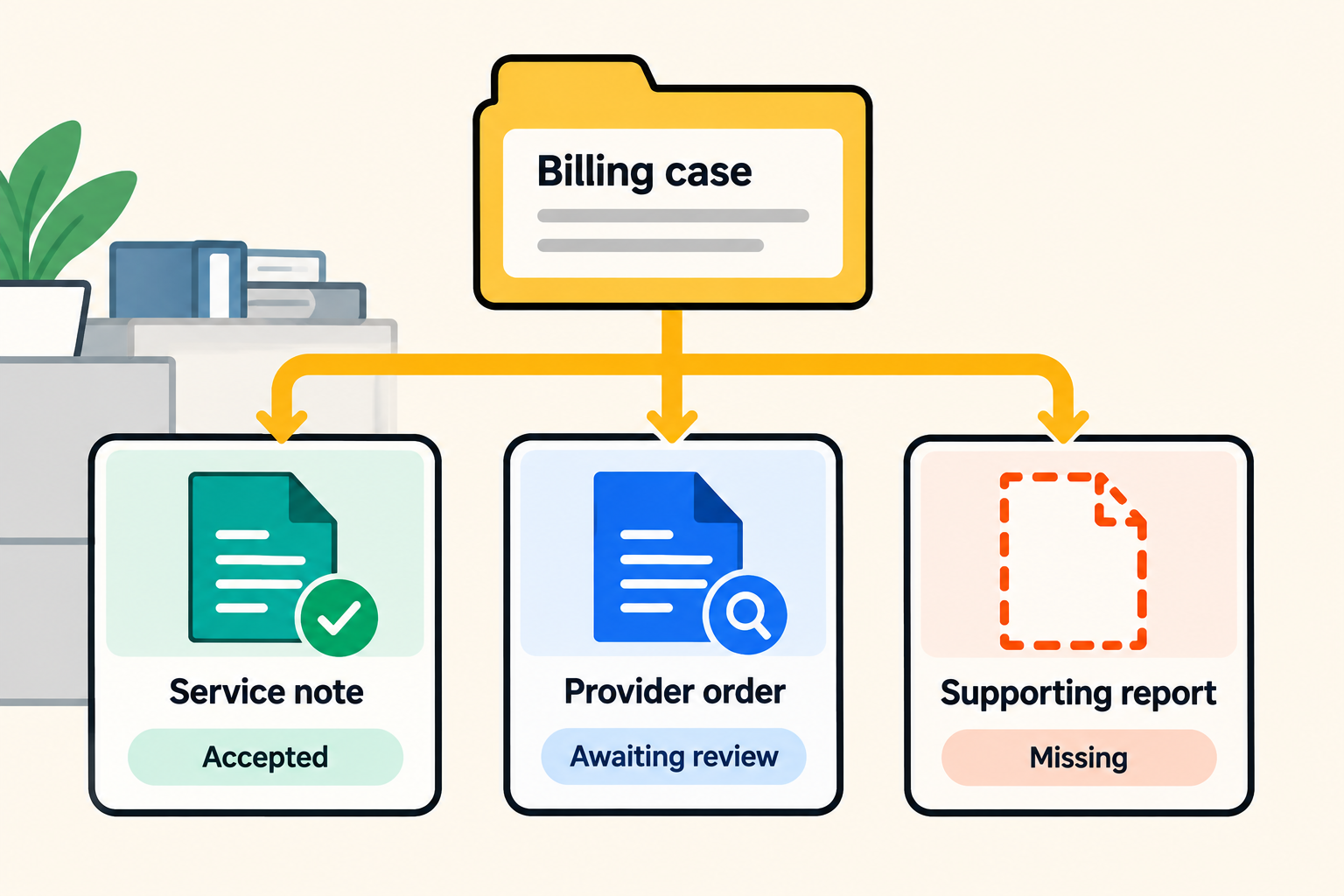
Before an employee begins billing review, the Health Information Manager needs to confirm that the case meets the documentation requirements for that stage. A file can be present while its relevance, completeness or acceptance remains unresolved.
The Centers for Medicare & Medicaid Services makes a related distinction in its MLN fact sheet Complying with Medical Record Documentation Requirements. In Medicare’s Comprehensive Error Rate Testing (CERT) reviews, insufficient documentation can include incomplete notes or a required element missing from a submitted record. The fact sheet also describes the billing provider’s responsibility to obtain supporting records held elsewhere when responding to a review request. Those are Medicare review requirements, not a universal checklist for every billing service, but they show why receipt alone cannot establish that evidence is sufficient.
For the illustrative case, the manager and billing reviewer have identified three records needed for the ordinary handoff. They document what each must establish, the relevant service or period, and who can accept it. The documentation reviewer checks the stated administrative requirements and refers clinical or coding questions to the appropriate specialist. The names below are sample requirements for this case.
Before any files arrive, a case record can identify those requirements and the work needed to satisfy them. One possible Kintone configuration keeps the case and its document requirements as separate records, linked by a case reference. A Related Records field can display the matching requirement records on the case. Each requirement can then have its own owner and review status while remaining associated with the billing work it belongs to.
The organization must define and create the expected requirements. Displaying related records does not discover an omitted requirement or decide that the case is complete. This is a proposed configuration for the example, not a prebuilt billing application.
Keep each requirement tied to the stage where it applies. Here, ready for billing review describes an internal handoff; it does not establish that the claim meets every condition for submission or payment. Those later decisions still follow the applicable procedure and payer requirements.
Give Missing Documents a Visible Status
The case contains three different positions at the same time. One record has been accepted, one needs an internal review, and one is still with the provider. The following sample shows what the manager needs to see before the handoff.
|
Expected record in this example |
Position before handoff |
Responsible person and next action |
|
Provider’s service note |
The note has been received and accepted for the defined review stage. |
The documentation reviewer records the basis for acceptance. No further collection is needed. |
|
Provider order requested for this case |
The file has arrived, but its review is pending. |
The documentation reviewer checks it against the case requirement. |
|
Supporting report requested for this case |
The expected report is missing. |
The records coordinator requests it from the provider and records the expected response date. |
Before requesting the supporting report, the coordinator creates its requirement record and identifies the provider as the source. A list built from received files would never show the report, because nothing has arrived. The manager can see that the report is missing and that collection belongs to the coordinator, even before a file arrives.
An attachment count would conceal the difference between the accepted note and the unreviewed order. Even adding the report would not settle the readiness decision until the required checks were complete. The manager needs the state of each requirement.
In this setup, a requirement record uses form fields for the document type, receipt date, review decision, next owner and follow-up date. A Link field can point to evidence in an approved repository with a usable URL; an Attachment field can hold a file where that storage has been approved. The review decision is recorded apart from the file itself.
Make Document Readiness Part of the Handoff
With the report missing and the order still awaiting review, the Health Information Manager holds the ordinary handoff and records the case as not ready for billing review. The accepted note remains accepted. The order stays assigned for review, and the report stays assigned for collection. Holding the case does not suspend those two tasks or merge their responsibilities. While the coordinator obtains the report and the reviewer checks the order, the manager consults the approved procedure to identify any limited work that an authorized exception would permit.
An exception is its own decision about the work permitted while evidence remains unresolved. In an alternative path for the same illustrative case, suppose the approved procedure permits an employee to check provider identifiers on the billing record while supporting documents are outstanding. The authorized manager can permit that limited task and record its scope. The case remains ineligible for the ordinary handoff, and the exception does not authorize claim submission.
The exception record names the approving manager, identifies the report as missing and the order as awaiting review, and explains why only the identifier check may proceed. Collection of the report stays with the coordinator, while review of the order stays with the documentation reviewer. Both requirements stay open while the permitted task proceeds.
For this case, the decision should also identify the employee doing the permitted task and when the exception must be reviewed. An administrative exception cannot waive an applicable payer or legal requirement. If the procedure does not allow limited progress, the manager holds the affected step and escalates the unresolved work.
Kintone can represent the distinction through a decision field on the case and configured Process Management actions. For example, the ordinary handoff action could be available only after the manager records the required readiness decision. A separate action could represent an authorized exception. Action conditions check supported field values; they do not inspect attachments or establish that related requirements have all been accepted. The manager must examine the requirement records before recording readiness, with permissions and assignments configured for the people authorized to make each decision.
Assign the Next Action When a Document Passes or Fails
While the report is being requested, the documentation reviewer examines the order already received. To continue the illustration, suppose it concerns a different service period and cannot satisfy this case’s stated requirement. The reviewer records that reason and assigns the records coordinator to obtain the correct document. The task has changed from internal review to external collection; leaving it labeled “received” would hide that change.
The coordinator can contact the provider with a specific request for the order covering the required service period. The missing report remains a separate request, even if the same provider contact handles both. Each requirement retains its own next action and expected response date, so the coordinator can identify which request each reply answers.
Kintone’s Process Management can assign a requirement record to the next employee when the configured action is performed. In the example, the coordinator records receipt and passes the requirement to the reviewer; a correction action can return it to collection. The overall case owner remains accountable for readiness while the individual requirements move between people.
The coordinator owns the request for the missing report, even if an alert also reaches the manager and reviewer. Reminder notifications can prompt the coordinator against a recorded follow-up date, but the record still needs the request history and the person to contact if no response arrives. The organization sets the escalation point according to the documentation required, the next administrative step and the applicable procedure.
Keep the date the requirement became outstanding apart from later follow-up dates. Otherwise, a reminder or replacement request can make a long-standing gap look newly opened. Record the arrival and review dates on their own as well, so time spent waiting for the provider is not confused with time waiting for an internal decision.
When the correct order arrives, it needs a fresh review against the required service period. Age alone does not disqualify a document; apply the date, version or validity rule that belongs to the requirement. Keep the earlier review decision distinguishable from the current one: the case should show which version was rejected, why, who rejected it and when, and which version was later accepted.
Show Managers Why the Case Is Waiting
At the start of this case, the missing report represents an external collection delay, while the unreviewed order represents internal work waiting to be done. A manager who sees only one “incomplete case” cannot tell which response is needed. Asking the provider to resend the order would add work without resolving the pending review.
Filtered views of the requirement records can split work awaiting a provider response from work awaiting internal review. Include the case reference, outstanding item, next owner and relevant dates. The report appears in the collection view. The order appears in the review view until it is rejected, after which its next collection task becomes visible.
The manager can then check the coordinator’s contact history for the report and the reviewer’s workload for the order. If both tasks concern the same case, they remain two work items associated with one case. Counting them as two blocked claims would misrepresent the workload. A case proceeding under a limited exception should stay visible in its own case view without removing either unresolved requirement.
Two measures make those views more informative. Collection waiting time runs from the request to receipt, or to the current date if the item is still missing. Internal review waiting time runs from receipt to the review decision, or to the current date if review is pending. If a document is rejected, preserve that cycle and record the new request so repeated corrections do not disappear inside one total.
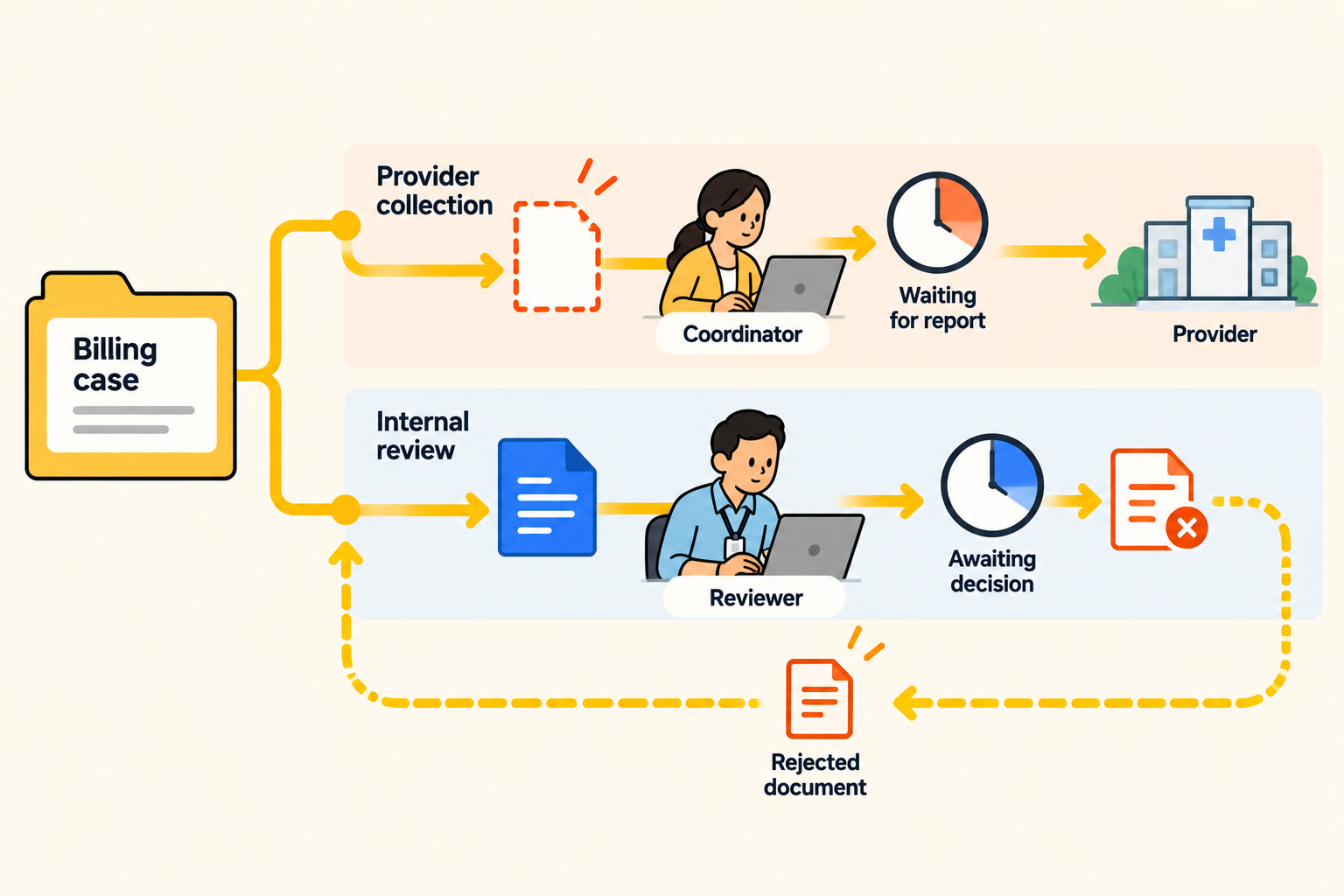
Across cases, a repeated wrong-period rejection could prompt a review of the instructions sent to providers. A growing internal review queue could prompt reassignment or a capacity discussion. A recurring pattern warrants investigation; a count alone does not explain its cause.
Resolve the Gap Before the Receiving Employee Finds It
Return to the original handoff with this record structure in place. The manager can see the missing report and pending order review before passing the case forward. Collection and review proceed under different owners. If a limited exception is permitted, the billing employee sees the authorized task and the work that remains prohibited.
Once the report and corrected order arrive and pass their required reviews, the manager can check the three accepted requirements and record the decision to release the ordinary handoff. Any limited exception can be closed with its reason and review history intact. The receiving employee can see what was accepted, who reviewed it and the basis for the transfer. In Kintone, Status History records when and by whom a configured approval was performed; the decision rationale still needs to be recorded by staff.
This changes where the problem is discovered and who acts on it. The receiving employee no longer has to reconstruct a missing-document request before starting billing review. Acceptance for that internal stage still does not guarantee payment or replace the remaining checks before submission.
Where the Tracker Sits Next to Clinical Records
The same coordination question can arise in billing services, senior care and other health-adjacent organizations without an EHR being the center of daily work. HHS identifies billing and claims processing involving protected health information on behalf of a covered entity as examples of business-associate activities. Administrative records therefore need appropriate data-handling review even when they sit outside a clinical system.
Keep clinical records in their required system of record. Before using a separate tracker, confirm what information it may contain, who may access it and which agreements and safeguards apply. A case identifier or document status may still reveal health information when linked to a person. A link to an external file does not, by itself, notify the tracker that the file has changed. Assign responsibility for keeping the recorded status current.
Test One Case Before Adding Another System
Use fictional case data to test your existing process with the same three positions shown above. The following five exercises reveal the work your team can coordinate and the decisions still being left to the receiving employee.
- Leave the supporting report absent. Confirm that its requirement, affected stage and collection owner appear before any attachment exists.
- Add the order without accepting it, then reject it for the wrong service period. Check that receipt, rejection and eventual acceptance stay distinguishable and that a replacement starts a new review.
- Pass the order between collection and review. Confirm that the next person can identify their task, due date and escalation contact without searching an email thread.
- Hold the ordinary handoff, then test a permitted administrative exception. Ask the receiving employee to identify the allowed task, unresolved requirement, approver and review date, and reconstruct the decision afterward.
- Review the case as a manager. Separate provider waiting time from internal review waiting time, then check that recorded rejection reasons could be compared across cases without counting one case as several claims.
If your current process passes these tests, document the rules and keep the assignments and evidence current; another system may not be necessary. If the tests leave missing requirements invisible or decisions dependent on someone remembering to send a message, define those failures as requirements for additional workflow coordination. Evaluate any new setup using the same case before introducing live records.
If the receiving person has to discover what’s missing after the handoff, the process is finding the problem too late.
Bring a fictional billing case to a Kintone workflow discussion and test how its document requirements, review decisions and permitted handoffs could be recorded and assigned.


About the Author
Agbaje Feyisayo is a dynamic content marketing expert with over 10 years of experience writing high-converting content across SaaS, technology, AI, and digital transformation. With a strong background in product marketing and storytelling, Agbaje helps top-tier companies turn complex ideas into actionable content that attracts and converts leads.