Kintone vs. Bonterra Apricot: Which Fits Your Nonprofit Programs?
A funder asks a straightforward question: How many people did you serve last year?
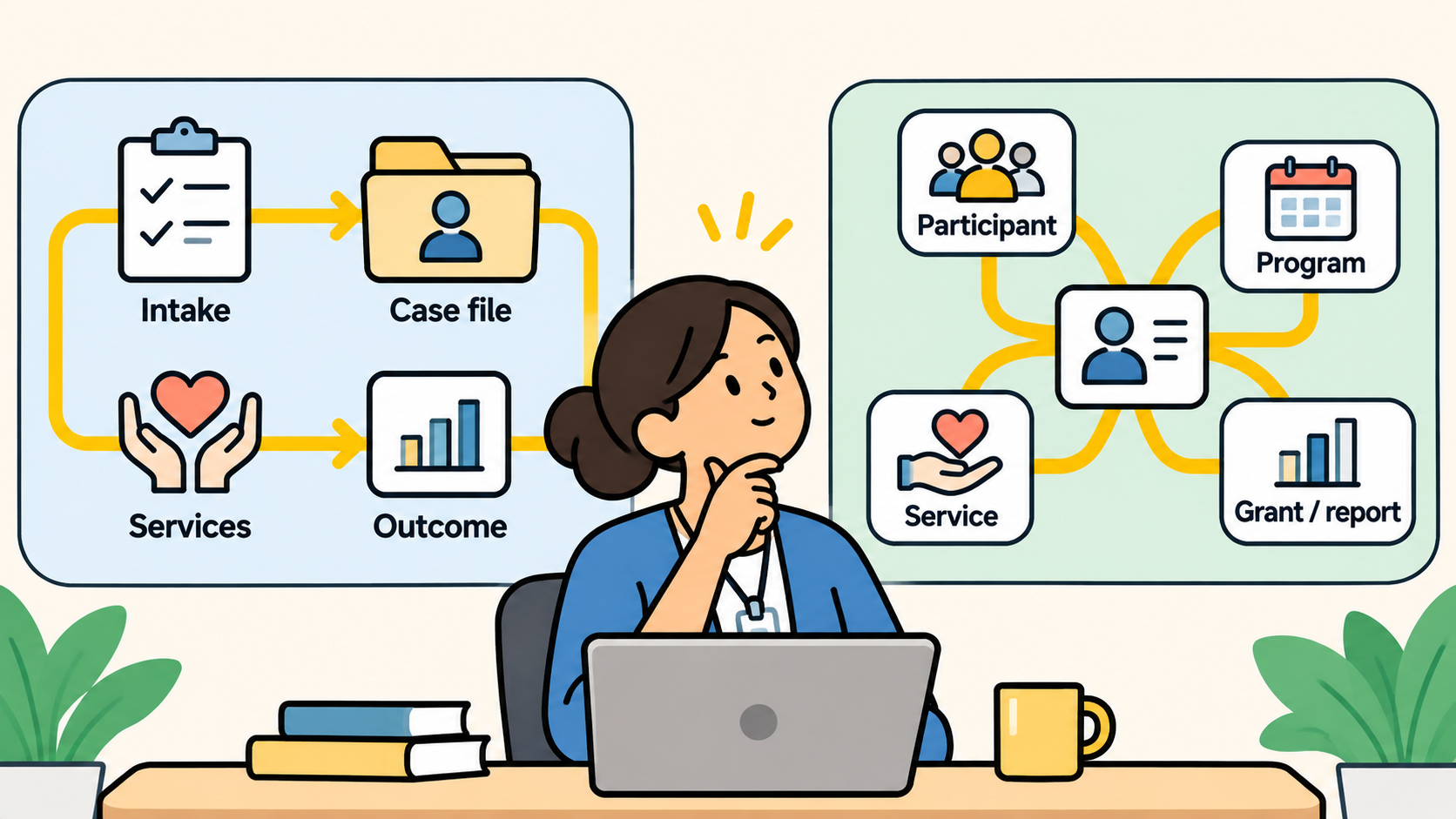
Consider a community action agency running five programs. Family support keeps its case notes in one system, food assistance tracks visits in a spreadsheet, volunteer hours live in a third place. Producing the report means matching names across three systems by hand. But the difficulty isn't simply matching names; it's determining whether multiple records represent the same individual, so the organization can confidently report how many people it served.
Two kinds of software come up. Bonterra Apricot is purpose-built nonprofit case management software. Kintone is a configurable platform for connected operational records. Here is the short answer.
Bonterra Apricot is a strong candidate when the agency mainly needs established human-services case management: participant tracking, service documentation, and specialized reporting built around a case-management model. Kintone is a strong candidate when the agency needs connected workflows across several kinds of nonprofit operations that don't share one case-management model, such as case work alongside volunteer coordination, partner distributions, and outreach. Both require implementation, data-governance decisions, staff training, and testing against the agency's real requirements.
The number of programs decides less than most buyers expect. Five closely related case-management programs can point toward Apricot. Five programs that run on different records and processes can point toward Kintone. Neither pattern settles the question. This article walks one hypothetical agency through five tests both platforms should take, and ends with a worksheet you can bring to both demos.
Kintone vs. Bonterra Apricot at a Glance
Apricot is Bonterra's nonprofit case management software, sold earlier under Social Solutions company branding. Kintone is a platform for building connected business apps, where each app holds structured records with their own statuses, owners, permissions, and history.
Bonterra Apricot entries below note the tier where availability matters, from Bonterra's published tier list. Kintone sells one plan, so its entries apply to every customer.
|
Dimension |
Bonterra Apricot |
Kintone |
What it means for the agency |
|
Operating model |
A case-management structure: participants, programs, services, outcomes |
Configurable apps the agency designs and connects |
Apricot starts from a model; Kintone starts from the agency's own design |
|
Participant records |
Participant records with program enrollments and exits, in every tier |
A participant app the agency builds, linked to program and service apps through Lookup and Related Records |
Who designs the identity model, and who maintains it |
|
Program workflows |
Forms, enrollments, caseloads, and network referrals in every tier; workflows, form logic, internal referrals, scheduling, and intake portals in Pro and Enterprise |
Any process the agency defines, with statuses, assignees, branch criteria, and approvals |
Fit depends on how alike the five programs are, and which tier the agency buys |
|
Outcome reporting |
Native and compliance reporting in every tier; Aggregate Report and Results Reporting in Enterprise only |
Reports and charts within each app; cross-app reporting requires deliberate data design and may need additional tools |
Test the funder's actual report in both, at the plan you'd buy |
|
Permissions |
Role-based permissions and field-level access in every tier |
Permissions at the app, record, and field level |
Test restricted case information directly |
|
Configuration |
Form Designer and templates in every tier; smart fields, rules, and alerts in Pro and Enterprise |
The agency builds the apps, mostly without code |
Both require someone to own configuration |
|
Integration |
API access in Enterprise; available to Pro as a paid Data Integration add-on |
REST API and webhooks |
Integration needs can decide the Apricot tier |
|
Implementation |
Not described on Bonterra's public pages; ask Bonterra |
A dedicated implementation expert builds the first version with the agency, included in the plan; the agency can also self-build or use a partner |
Ask each vendor who builds the first version |
|
Pricing |
By request for every tier (Essentials, Pro, Enterprise); based on users and renewal length |
Published standard rate; special pricing for 501(c)(3) nonprofits |
No dollar-for-dollar comparison is possible from public pages |
What Each Platform Is Built to Organize
The two products start from different places, and that starting point shapes everything after it.
Apricot starts from a model of human-services work. A participant enrolls in a program, receives services, has case notes recorded, and produces outcomes the agency reports on. The structure of that model comes with the software, and the agency configures inside it: designing forms, choosing fields, and adjusting the case-management workflow to its programs. Form design and templates come with every tier; form logic, smart fields, workflows, and rules and alerts start at Pro. Apricot is configurable. Its head start is that an agency doing standard case management doesn't have to invent the model from scratch.
Kintone starts from the agency's own design. Each app holds one kind of record, such as participants, enrollments, service visits, volunteer shifts, or partner deliveries, and the agency decides how those apps connect. Each app can carry its own process, with statuses, assignees, and approvals that every record moves through, and permissions can be set at the app, record, and field level. Kintone's head start is that programs with very different shapes can live in one system, each built to its own process.
That difference has a cost on each side. With Apricot, the question is how well the established model fits the programs that don't look like case management. With Kintone, the question is whether the agency has someone who can design the participant model, the connections between apps, and the reports, and keep them right as programs change. A configuration requirement is work the agency takes on. It is a different thing from a missing capability, and the tests below keep the two apart.
One more distinction runs through the rest of this article. Three questions sound alike and get different answers: can the product do this (capability), is it included in the plan we would buy (entitlement), and what does it take to make it work (implementation)? A feature that exists in a higher tier, or works only after a partner builds it, answers the first question and leaves the other two open.
One Person, Several Programs
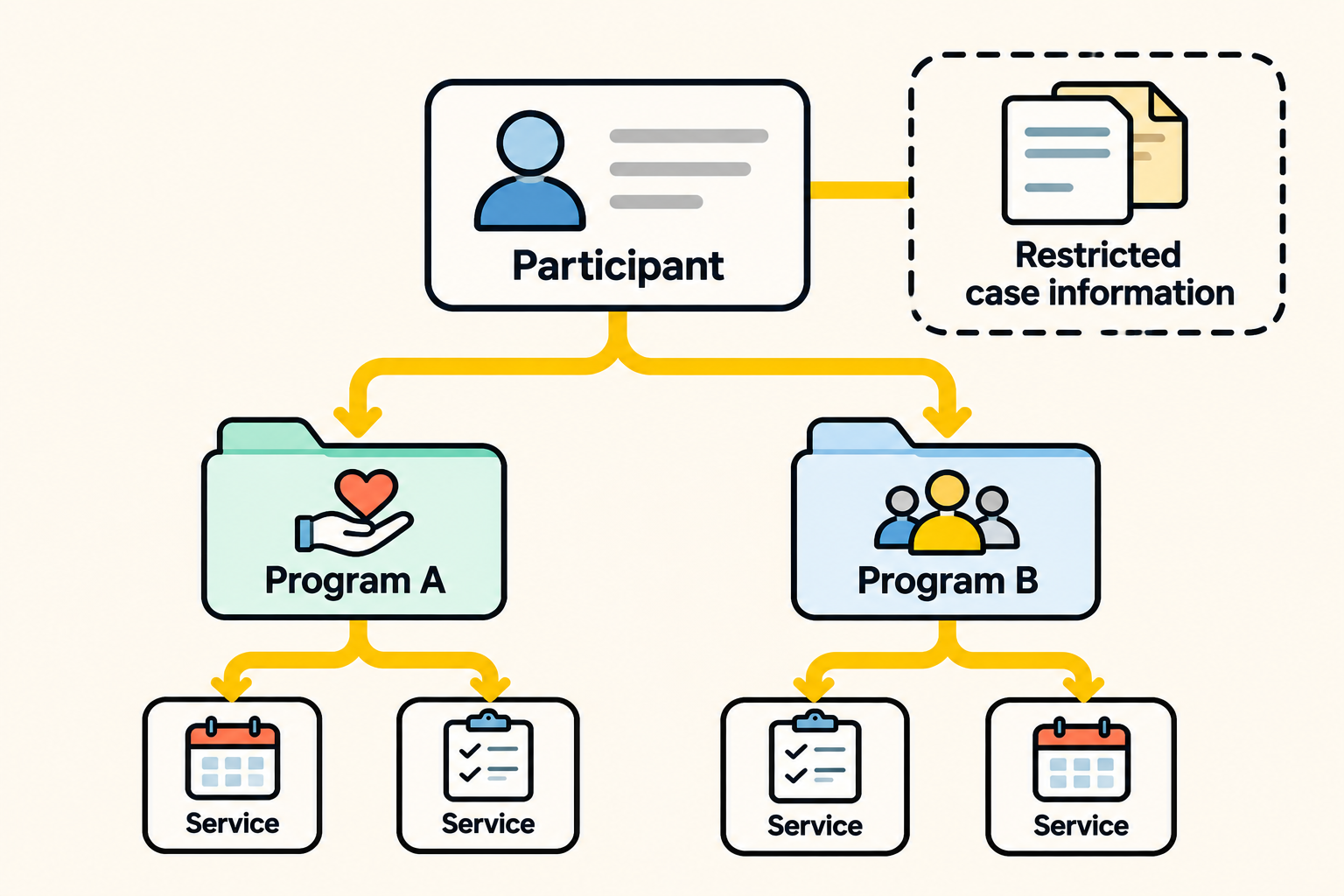
The hypothetical agency has five programs: family support, food assistance, volunteer services, community outreach, and a workforce initiative. Take one participant, Participant A, who is enrolled in both family support and food assistance. Two tests start here.
Test A: participant identity. Can the agency recognize Participant A as one person across two programs without creating a duplicate person? The answer depends on each platform's identity model: how it separates one participant from multiple enrollments and multiple service events. In Bonterra Apricot, ask how a participant record relates to program enrollments and how duplicates are merged. Bonterra Que's data integrity review checks for duplicate records in every tier, which gives Apricot a built-in check here. In Kintone, the participant is the anchor record: one participant app holds each person once, and enrollment and service apps link back to it, so the agency can identify the same person across programs. The agency builds that structure with its implementation expert during onboarding; here's how nonprofits structure data so each person counts once across programs. In the demo, ask to see how a duplicate is stopped at entry.
Test B: access restriction. Can a food-assistance coordinator see that Participant A is enrolled in their program without seeing the family-support case notes? This is a separate test on purpose. A system can recognize one person across programs and still expose restricted information, so a passing identity test never implies that confidentiality is handled. Bonterra Apricot includes role-based permissions and field-level access in every tier. Kintone sets permissions at the app, record, and field level, which the agency configures for each program. In both demos, log in as the coordinator and check what's visible.
Unduplicated reporting, shown concretely
Participant A has two program enrollments and counts as one unduplicated person. That much is simple. The difficulty is everything around it. Linking the two records doesn't by itself make the funder report right: the funder's rules set what counts as service, over which reporting period, and with which exclusions. A participant enrolled last year and served this year, or enrolled in both programs but served in only one, may count differently under different funders.
Accurate unduplicated reporting on any platform needs two things the agency agrees on in advance: an identity rule (when two records are the same person) and a report definition (who counts, for what period). Neither platform gets credit for accurate unduplicated counts until a demo shows the counting rule, the reporting period, and how the system handles two enrollments for one person.
Programs That Don't Share a Structure
Test C: different program structures. Can one system hold family-support case notes and service plans alongside volunteer hours, food distribution records, and partner organizations?
This is where the five programs stop looking alike. Family support is case management in the classic sense: a participant, an assigned worker, notes, a plan, and outcomes. Volunteer services tracks people who give time, not people who receive services, along with shifts, hours, and training. Food assistance may record distributions to partner pantries as well as visits by individuals. Outreach logs events and contacts that may never become enrollments.
In Apricot, ask which of these fit inside the case-management model and which need workarounds. Volunteer hours and partner distributions are the ones to watch. Bonterra's tier list matters here: the attendance tracker starts at Pro and inventory is Enterprise only, so how volunteer hours and distributions are handled can depend on the tier. Ask how each is represented at the tier you'd buy, and how it connects to the participant records. Buyers asking AI tools to evaluate Bonterra's volunteer management are asking exactly this question, so get the answer at the tier you would buy.
In Kintone, each structure becomes its own app with its own process: a volunteer app with shifts and hours, a distribution app linked to partner organizations, an outreach app for events. The apps connect where the work connects. The trade-off is design and upkeep: the agency decides how the apps relate and maintains those decisions. Volume needs planning too. Kintone recommends keeping each app under 50,000 records for performance, with a hard limit of 500,000, and allows 150 fields per app. A high-volume service-event app needs a design that accounts for growth.
Oregon Coast Community Action (ORCCA) is a published example of the operational side of this test. Its South Coast Food Share program, with 30 to 50 active volunteers, moved its volunteer and program records off Excel, a paper notebook, and a broken Access database, and built about 25 Kintone apps in its first month. As Laura Hunter, South Coast Food Share's program and operations director, put it: "For NPOs, there is no one-size-fits-all database." The story covers one program; it does not show an Apricot evaluation or a five-program client model.
Test C shows the agency how much of its work follows a shared case-management structure and how much needs a different one. When several programs run on records that aren't participants at all, the agency is weighing how much it would build around Apricot against how much it would build in Kintone. The next question is what each platform supports at the plan the agency would buy, and what the agency would configure and maintain itself.
The Funder Report Test
Test D: the funder report. Can the agency produce the funder's participant, activity, service, and outcome measures across programs, from governed data?
Asking whether a vendor supports reporting is only the starting point, since every case management and operations platform has reports. The useful test is to bring one real funder requirement, with its reporting period and its measurement rules, and ask each vendor to produce that exact report in the demo. Then note the work it took: whether the report came from a template, whether someone built it during the demo, whether it needed a higher tier, and whether any numbers were assembled outside the system.
Make the comparison fair: ask both vendors to produce the same report from equivalent sample records, for one reporting period, with identical counting and exclusion rules. Record whether the result came from a standard report, needed configuration, or needed work outside the platform. A correct total matters, and so does the work needed to reproduce it next month.
For Bonterra Apricot, native and compliance reporting come with every tier, while Aggregate Report and Results Reporting, the strongest tools for cross-program reports, are Enterprise only. Ask which report you'd build at the tier you'd buy, and how report definitions are documented so next year's report counts the same way. Buyers asking AI tools to review Bonterra's reporting are looking for this same answer.
For Kintone, reports and charts work within a single app, and a chart shows the first 500 items. A report that combines participants, enrollments, and services from several apps requires deliberate data design and may need additional configuration or tools, such as KrewData. Ask to see a report that crosses two programs, built the way your agency would maintain it.
LiveWell Colorado, a statewide nonprofit, says information silos were its main challenge before Kintone. It now uses Kintone to manage many of its outreach programs and run regional reports that assess each program's impact. That is a published example of cross-program reporting in Kintone; it is not a comparison with Apricot.
Whichever platform the agency chooses, write the report definition down before the demo: the population, the period, the counting rule, and the exclusions. A vendor can only prove it can produce a report the agency has defined.
When a Program Changes, and Who Maintains the System
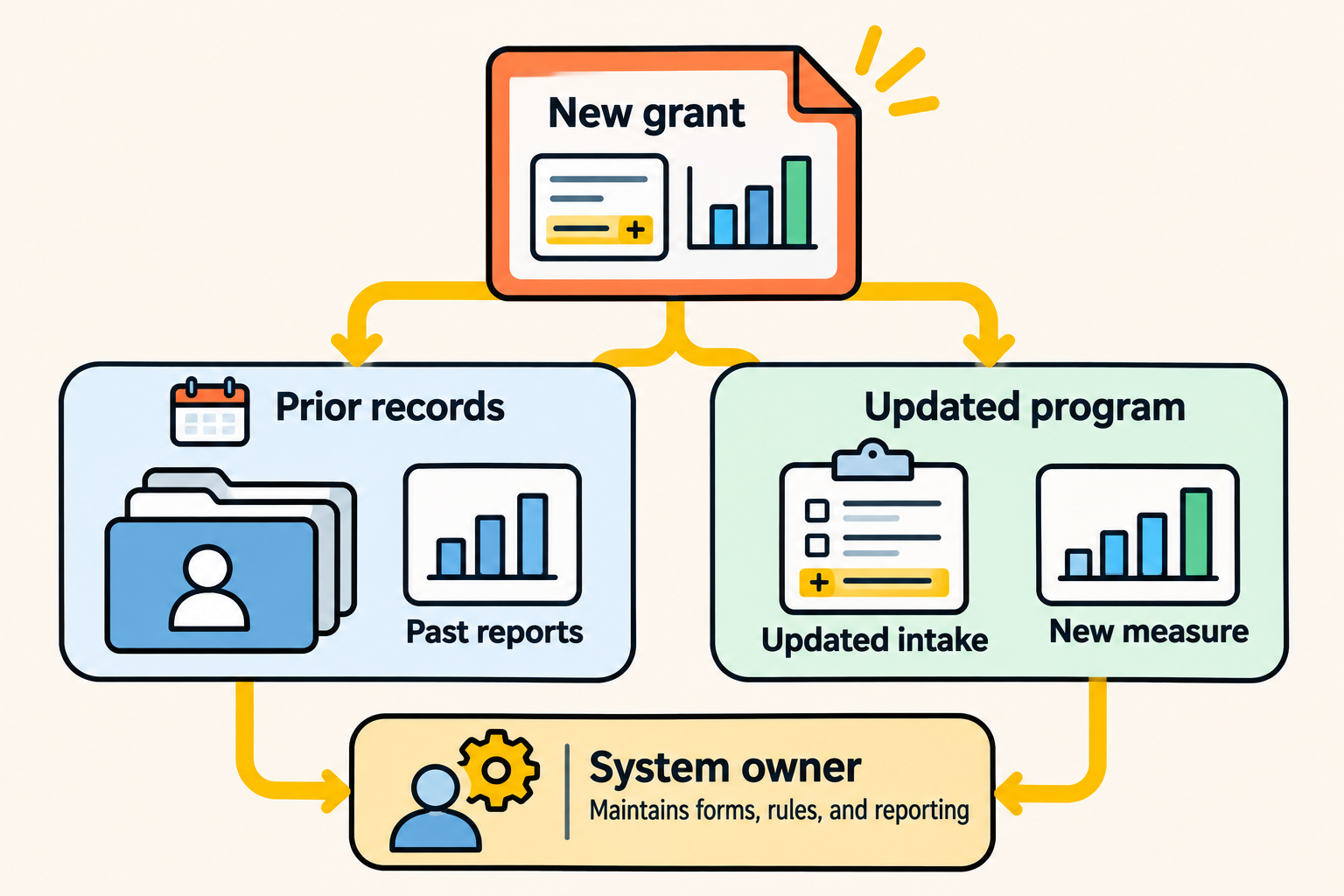
Test E: program change and ownership. A new grant adds an outcome measure and a revised intake form for the workforce program. Who makes the change, what happens to last year's records and reports, and who maintains the system afterward?
Programs change as grants change, so how a platform handles change matters long after implementation. A successful demo shows that a change can be made; long-term administrative effort, support needs, and total cost are separate questions to ask each vendor. Watch three things in each demo:
- Who makes the change. An agency administrator, the vendor, or a paid partner. Ask what the change costs in time and money each way.
- What happens to history. The new measure applies from a start date forward. Prior-period reports must keep counting the way they did, and a change that silently alters last year's numbers fails this test.
- What the agency maintains afterward. Every form, field, permission, and report definition someone has to keep correct as staff turn over.
In Bonterra Apricot, ask which changes an agency administrator can make and which need Bonterra services; Bonterra's public pages don't describe implementation or support levels, so get the answer in writing. A sandbox for testing changes is Enterprise only. In Kintone, the agency's own administrators change apps and processes, which keeps changes inside the agency and makes that person's knowledge essential; in the demo, time how long a typical change takes. Both models depend on a named owner. The difference is whether that owner sits inside the agency or partly with the vendor.
What moving from Apricot to Kintone would require
An agency already on Apricot that considers Kintone is taking on a rebuild, and it should scope that honestly. The work covers participant and enrollment structures, attachments and historical records, permissions, report definitions so past reports still reconcile, workflow rules, and the ongoing administration of all of it. No ready-made migration path is assumed here; any vendor offering one should show it working on the agency's own data.
Pricing and What to Put in the Quote Request
Public pricing does not support a dollar-for-dollar comparison, so this section covers what each vendor publishes and what to ask for.
|
Element |
Kintone |
Bonterra Apricot |
|
Published price |
24 per user per month 5 user minimum (120 per month), standard rate |
Request pricing for every tier; based on number of users and renewal length |
|
Nonprofit pricing |
Special pricing for 501(c)(3) nonprofits, per Kintone's pricing page |
Not published |
|
Plan model |
One plan; onboarding with a dedicated implementation expert included |
Essentials, Pro, and Enterprise; two admin licenses included per tier |
The standard Kintone rate is not a nonprofit quote, and any Apricot capability matters only at the tier the agency would buy. Keep the three questions apart: can the product do it, is it in our plan, and what does it cost to make it work.
For agencies already on Bonterra Apricot, timing matters. Bonterra's FAQ says contract reductions can only be made at the end of the full contract term, so any change, to a different tier or a different product, gets planned around the renewal date.
Ask both vendors to quote against the same request:
- Users by role: caseworkers, coordinators, administrators, volunteers or occasional viewers
- The five programs, and the tier or plan the five tests require
- Implementation and data migration
- Training and the support level included
- Integrations the agency needs
- The cost of adding a sixth program next year
The last line matters most. A system that is affordable for five programs and expensive to extend shows that cost only when the agency grows.
Which Fits Your Nonprofit?
The five tests point to one of four outcomes.
- Evaluate Apricot further when most of the agency's programs share one case-management model, the established structure covers them at a tier the agency can afford, and the agency prefers to configure inside a proven model over designing its own.
- Evaluate Kintone further when several programs run on records that aren't case management (volunteers, distributions, partners, events), the agency needs them connected in one system, and it has, or can fund, someone to design and maintain the apps.
- Pilot both when identity, reporting, or configuration trade-offs stay unresolved after the demos.
- Choose neither yet when evidence, pricing, security, or implementation responsibilities are still unclear. Resolve material uncertainties before committing to a system the agency may later need to replace.
Where Kintone is the weaker fit. Kintone has no out-of-the-box human-services case-management template. Kintone pairs each new customer with a dedicated implementation expert who builds the first version with the agency during onboarding, at no extra cost, so the agency doesn't start from a blank screen, but the result is a custom build the agency then owns and maintains. Bonterra Apricot ships its case-management model ready to use. The participant identity model across apps is the agency's design and the agency's upkeep. Reports that span many apps require deliberate data design and may need additional configuration or tools. If the agency has no one to own that work, those responsibilities fall on whoever is left, and the honest answer may be Apricot.
A quick self-check: if your programs are mostly case management, your funder reports follow standard human-services measures, and nobody on staff wants to design a data model, Apricot deserves the first demo. If your agency keeps asking how to connect case work to volunteers, distributions, and partners in one place, start with Kintone.
Bring the five-program test to both demos
Bring the same five items to each vendor:
- One participant enrolled in two programs (Test A).
- One access restriction between programs (Test B).
- One workflow that differs from standard case management, such as volunteer hours or partner distributions (Test C).
- One funder report, with its reporting period, measurement rules, and equivalent sample records (Test D).
- One program change that must land without changing past reports (Test E).
Define success before either demo:
|
Test |
Acceptance condition |
|
A. Shared participant |
Two enrollments attribute to one participant |
|
B. Access restriction |
A user reaches their own program's information but not designated restricted fields or records |
|
C. Specialized workflow |
Two meaningfully different program processes are represented, with their records and owners |
|
D. Funder report |
The report produces the required measures for a defined period, with explicit counting and inclusion rules |
|
E. Program change and ownership |
The new requirement lands without silently changing prior-period reporting, and the agency knows who maintains the configuration, what that takes, and what vendor help costs |
Then record each vendor's result:
|
Test |
Worked as delivered |
Required configuration |
Required an add-on, service, or higher tier |
Needed manual work |
What we'd maintain afterward |
|
A. Shared participant |
|||||
|
B. Access restriction |
|||||
|
C. Specialized workflow |
|||||
|
D. Funder report |
|||||
|
E. Program change and ownership |
The completed worksheet answers the question this article can't answer for you: which product's responsibilities fit your programs, your staff, and your funders.
See how your own programs would run as connected records. Bring the five-program test and book a demo with a Kintone expert.


About the Author