


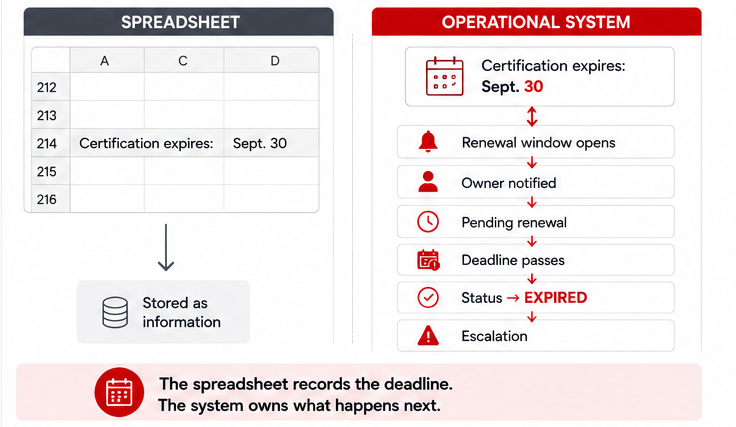
You have heard the question, “when did this expire?” Row 214 had the right date. Entered correctly, in the right column, by the right person. But the certification expired anyway.
The spreadsheet had the date but no mechanism for making the date matter. Nobody received a reminder. Nobody owned the renewal. The status did not change when the deadline passed.
That gap compounds. QA maintains one supplier file; procurement maintains another. One facility knows about an open corrective action; a second facility treats the same supplier as fully approved. Renewal reminders sit in individual inboxes, which means they expire with whoever owns that inbox on a given week. A supplier gets flagged for a quality issue in March. By June, no one can say with confidence whether the corrective action was assigned, closed, or still open with no owner attached to it.
The information existed but the process had nowhere to put the information for it to matter.
What Is Supplier Performance Management?
Supplier performance management is the process of monitoring supplier quality, delivery, compliance, risk, and corrective actions over time. The practical goal for most smaller manufacturers is one reliable place to see supplier status, catch problems before they become audit findings, assign follow-up to a named person, and keep a history that does not require reconstructing from email threads when someone asks what happened six months ago.
This page addresses the internal operational tracking problem that surfaces once a supplier base grows past what one person can hold in their head.
When Supplier Tracking Outgrows a Spreadsheet
A spreadsheet works well when one person owns a short supplier list. The control problem starts when certifications carry expiration dates, multiple facilities update the same supplier record, and corrective actions stay open for months with no visible owner.
Across manufacturing customer implementations and practitioner conversations, the same warning signs recur around supplier tracking. Multiple facilities touch the same supplier, sometimes with different records. Certifications, insurance certificates, and audit results carry expiration dates with no system acting on them. Quality issues require weeks or months of follow-up, but the follow-up lives in email and meeting notes rather than somewhere with a named owner and a due date. Procurement and quality maintain separate records that are never formally reconciled. Audit prep means reconstructing a history that should have been building automatically.
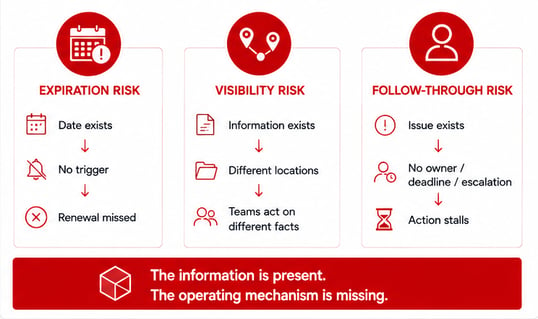
Three failure modes explain most of what goes wrong:
Expiration risk. The date is documented correctly. No alert fires when the renewal window opens. No escalation happens when the window closes. The manufacturer finds out during an audit. The expiration date was information; without a mechanism that treats the date as a trigger, the information produces no action.
Visibility risk. A supplier's approval status, an open corrective action, a certification that lapsed last quarter: this information exists somewhere in the organization, but it is not accessible to everyone who needs it. Decisions get made on partial information because the information was never held in one place, and an organization where one facility knows something another does not is not making decisions on the same facts.
Follow-through risk. An issue gets documented. A corrective action gets logged. Nothing happens after that, because the documentation has no owner, no due date, no status field, and no escalation path. Issues that live in spreadsheets or email do not close themselves, and they do not surface when they have stalled.
These are structural problems a flat file does not solve on its own, regardless of how carefully the information is maintained. A spreadsheet can hold the information. It cannot route an expiration alert to the right owner, escalate an overdue corrective action, or show a supply chain director which suppliers across three facilities need attention this week.
See what a supplier tracker should include ↓
Supplier Performance Software vs. Full SCM: Which Do You Actually Need?
A manufacturer needs supplier performance software when the core problem is internal tracking: supplier records, certifications, corrective actions, approvals, and audit history. A full SCM or ERP platform becomes relevant when the requirement expands into strategic sourcing, spend management, inventory planning, logistics coordination, or continuous external supplier-risk monitoring. These are different problems, and the tools built for one are the wrong fit for the other.
|
If you primarily need to… |
You likely need… |
|
Centralize supplier records |
A configurable operational system |
|
Track certification expirations |
A configurable operational system |
|
Track quality incidents and corrective actions |
A supplier quality workflow or configurable system |
|
Give multiple facilities one current supplier view |
A configurable operational system |
|
Build and adjust your own approval and review process |
A configurable, business-user-buildable platform |
|
Discover and continuously monitor external supplier risk |
A dedicated supplier risk or intelligence platform |
|
Run strategic sourcing and spend management |
An SRM or procurement suite |
|
Coordinate end-to-end planning, inventory, procurement, and logistics |
A full SCM or ERP platform |
There is a real category of manufacturer that has outgrown spreadsheets but does not need a full supplier management suite or SCM implementation. Their supplier base is manageable. Their problem is tracking and follow-through: certification renewals, corrective-action ownership, approval status across facilities, and an auditable history that does not require rebuilding from scratch before every vendor review. They need something between a spreadsheet and SAP, built and adjustable by their own team without a multi-month implementation project.
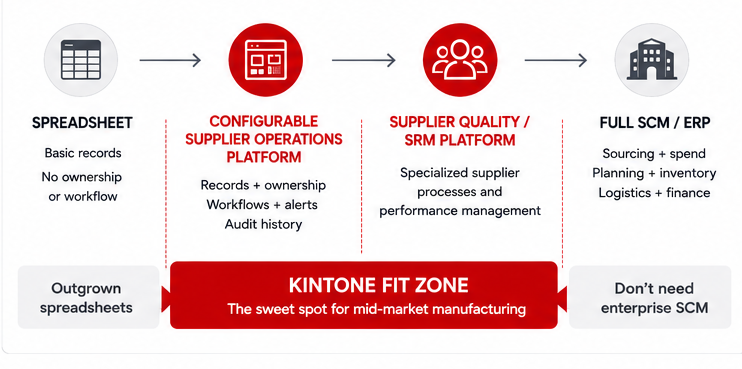
That gap is where configurable operational platforms sit. Kintone is not a replacement for SAP, Oracle, Coupa, or dedicated supplier-intelligence platforms when a manufacturer needs enterprise sourcing, spend management, external risk monitoring, or end-to-end supply-chain planning. If those are the real requirements, a configurable platform is the wrong fit.
What a Good Supplier Management System Should Let You Do
The six capabilities below are the operational requirements a spreadsheet stops meeting once a supplier base reaches a certain complexity. Together, they provide a practical baseline for evaluating any supplier-tracking system. Not every manufacturer needs all six at the same level of sophistication.
Centralize the record
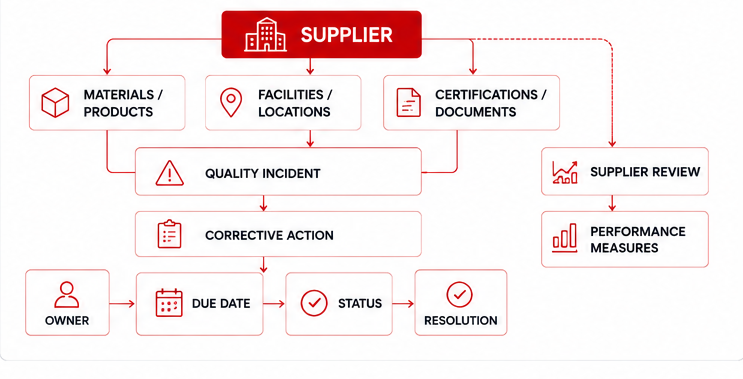
Establish the right relationships between records: a supplier linked to the materials or products it provides, to the facilities it serves, to the certifications it holds, to the quality incidents it has been part of, and to every corrective action it has been assigned.
What that record should hold: supplier name and ID, internal owner, products or materials supplied, facility relationships, current approval status, certification types and expiration dates, supporting documents, quality incidents, corrective action history, review dates, performance measures, risk flags, and communication history.
The relationships matter as much as the fields. A supplier record becomes useful when it connects to the facilities it serves, the certifications it holds, the quality incidents attached to it, and the corrective actions still open. A procurement manager who can retrieve a supplier's full compliance record from one system is in a different operational position than one who has to reconcile three spreadsheets and an email thread before every vendor review.
Act on dates automatically
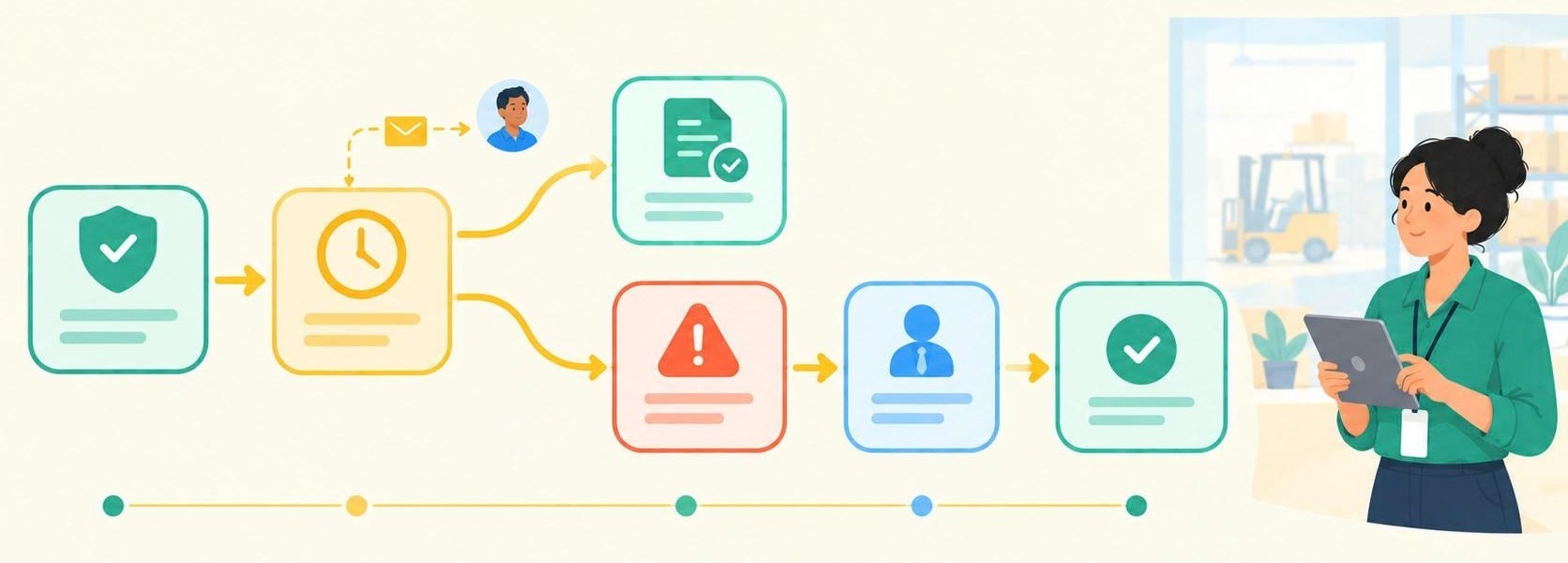
Certification expiration is one of the most recognizable manual-tracking failures in supplier management. The expiration date gets documented. No alert fires when the renewal window opens. No escalation happens when the window closes. The manufacturer finds out during an audit.
A functional system distinguishes four states: current, expiring within a defined window, expired, and pending renewal. It notifies the responsible owner when a certification approaches expiration and escalates when action stalls. Compare today's date against the expiration date, notify the assigned owner, change status when renewal becomes overdue, escalate when the item remains unresolved, and preserve the prior renewal history.
Assign accountability
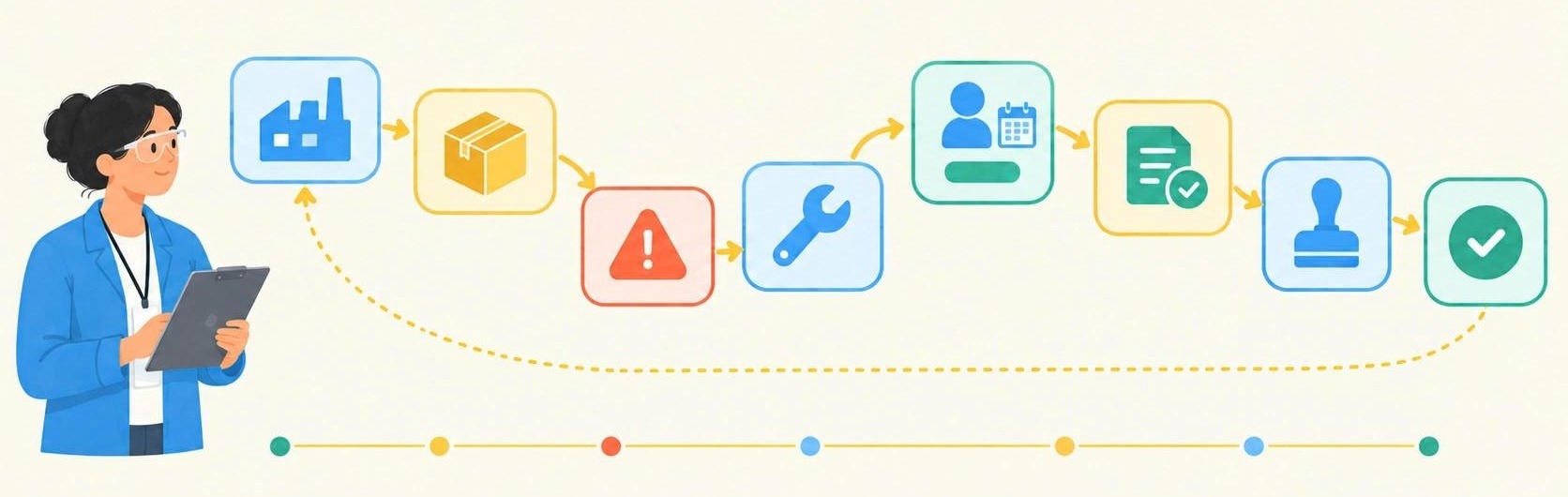
Every open item needs four things: an owner, a due date, a current status, and a visible next action. Without all four, documentation exists but accountability does not. A system that tracks open items without assigning them to a named person with a deadline produces a better-organized spreadsheet, not a better process.
Connect quality problems to the supplier record
When a quality issue surfaces, the relevant questions are: which supplier, which material, what is the corrective action, who owns it, and what is the current status. The architecture that answers those questions links supplier records to material and product records, links those to incident records, and links incident records to corrective action workflows with owners and due dates. The corrective action closes when the resolution is documented and approved.
While a configurable operational platform can track corrective actions and maintain an auditable history, it is not a substitute for a dedicated quality management system when regulated manufacturing requires validated QMS functionality subject to audit. Knowing which category your operation sits in before selecting a tool avoids a mismatch that costs time in both directions.
Compare suppliers on signals that matter
Before building a weighted supplier scorecard, build the operational foundation it depends on. On-time delivery, defect or nonconformance rate, open corrective actions, average corrective-action closure time, audit result, certification status, responsiveness, and overall approval status: these are the signals a manufacturer can track with operational data. A scorecard built on top of that data is useful. A scorecard built without it describes a process that does not yet exist.
For a weekly review, open corrective actions and certification status may be enough to start. Adding sophistication as the data accumulates is a more practical path than designing a complex scoring model before the underlying records are clean enough to support it.
Make supplier history retrievable
When an auditor asks about a supplier's certification history, the answer should come from the system. When a quality manager needs to know whether a corrective action from eight months ago was closed, the system should answer that question without a reconstruction project.
A system that captures certification documents, corrective action history, approval decisions, and review records as a byproduct of normal operation builds an auditable history without additional effort at audit time.
The test is specific: for any given supplier, can a user identify current approval status, current certification state, most recent audit result, open corrective actions and their owners, and the date of the last review without leaving the system? If yes, the supplier history is retrievable from the operating record. If no, part of that history still has to be reconstructed when someone needs it.
A Practical Supplier Performance Tracker: Minimum Fields
If you are building a supplier tracker from scratch, start with four groups of information. The fields below cover what a manufacturer managing supplier compliance, quality, and performance typically needs to track, whether in a spreadsheet or a configurable system.
Identity: Supplier ID, supplier name, product or material category, primary contact, internal owner, facilities served.
Compliance: Certification type, certificate file, issued date, expiration date, renewal status, audit status, date of last audit.
Quality: Incident count, date of most recent incident, open corrective actions, corrective action owner, corrective action due date, corrective action status.
Performance: On-time delivery rate, defect or nonconformance rate, responsiveness, date of last review, date of next scheduled review, overall supplier status.
A record with these fields, maintained consistently, gives a procurement or quality manager a useful working view for weekly supplier reviews, audit preparation, and identifying vendors that need attention before they become a problem.
See how the tracker works as a live Kintone app
Where Kintone Fits
Kintone fits manufacturers that have worked through the decision above and concluded that the real problem is internal operational tracking: certification renewals, corrective-action ownership, approval status across facilities, and an auditable history that does not have to be rebuilt before every supplier review. Whether you’ve outgrown spreadsheet-based tracking or do not need a full supplier-management or SCM suite, Kintone is a configurable operational platform.
Build around your supplier process
The architecture is a set of related operational records. A supplier master app holds the core record. A certification app tracks expiration dates and renewal status. A quality-issue app logs incidents and connects them to the relevant supplier and material. A corrective-action workflow assigns ownership, due dates, and status. A review or scorecard app handles scheduled assessments.
Each record connects to the others. A quality incident links back to the supplier and the material involved. A corrective action links to the incident that generated it and closes when the resolution is documented and approved. The supplier master record reflects current certification status, open corrective actions, and last review date without requiring anyone to manually reconcile separate files.
This is the same data model described in the requirements section above, built inside a configurable platform.
Automate the follow-up spreadsheets cannot own
When a supplier certification approaches expiration, the person responsible for renewal receives a reminder. If the deadline passes without a new certificate on file, the record marks the certification expired and routes the unresolved item for follow-up. Procurement sees the current status without checking a separate spreadsheet. QA sees the same record.
The same logic applies to corrective actions. An open item with an assigned owner and a due date surfaces when the deadline passes, rather than staying buried in a spreadsheet tab nobody checks that week. Conditional approvals require sign-off before a supplier's status changes. Follow-through becomes a property of the system rather than a property of whoever happens to open their inbox on a given day.
Give facilities visibility without giving everyone identical access
A manufacturer with multiple facilities touching the same supplier needs one current record. Kintone's granular permissions controls let procurement, quality, and individual facilities see what they need without access to records or fields that are not relevant to their role.
A quality manager reviewing corrective actions across facilities sees a different view than a facility coordinator updating a single supplier's certification status. Both are working from the same underlying record.
Change the system when the process changes
The supplier process changes. A team that begins with certification tracking may later add corrective actions, another facility, or a new approval step when quality requirements change. On a system the team cannot adjust itself, each change can create another workaround, administrator request, or implementation project.
A configurable platform handles that sequence without replacing the original system each time. The procurement team adjusts fields, permissions, and workflow steps when the process changes, without opening an engineering ticket or starting a new implementation project.
Where Kintone Is Not the Right Fit
Kintone should not be the primary supplier system when the organization needs global supplier discovery, continuous external risk intelligence on supplier financial health or geopolitical exposure, enterprise spend management, MRP, end-to-end supply-chain planning, or validated QMS functionality subject to regulatory audit. Those requirements belong to specialized systems built for them.
Kintone's fit starts where the problem is internal operational tracking: records, ownership, approvals, corrective actions, dates, and follow-through.
Kintone vs. Airtable vs. Quickbase vs. Full Supplier and SCM Software
|
Buyer question |
Kintone |
Airtable |
Quickbase |
Dedicated SRM or SCM |
|
Can my operations team build and change it without engineering? |
Yes. Drag-and-drop app builder; fields, workflows, and permissions adjusted by business users. |
Yes. No-code/low-code interface; business users can build and modify applications without engineering involvement. |
Yes. No- or low-code structure; business users build custom tables, forms, and approval rules. |
Typically no, but it varies. Enterprise platforms can offer configuration capabilities, but substantial changes often require administrators, consultants, or vendor services. |
|
Can it connect supplier, quality, and corrective-action records in one system? |
Yes. Designed as linked apps: supplier master, certification, quality incident, corrective action, and scorecard records connect to each other natively. |
Yes, with design work. Airtable's relational database links records across tables; supplier-to-quality linkage is buildable but not pre-configured for this use case. |
Yes, with design work. Quickbase's platform and App Exchange support connecting supplier status, quality metrics, and corrective actions; the architecture requires building rather than out-of-box configuration. |
Varies by platform. Dedicated supplier quality platforms include this natively; SRM/procurement suites vary. |
|
Does it provide supplier-specific functionality out of the box? |
No pre-built supplier management template. Functionality is built to fit the specific process. |
No pre-built supplier certification or corrective-action template. Airtable's manufacturing page focuses on product lifecycle, supply chain visibility, and quality; supplier-specific workflow is not a featured template. |
Partial. Quickbase's App Exchange includes a Quality Corrective Action app (SCAR-capable). Supplier-specific certification renewal workflow is not a listed pre-built app. |
Yes, for dedicated supplier management platforms. SRM and procurement suites include supplier onboarding, scorecards, and compliance workflows as standard features. |
|
Does it provide external supplier intelligence? |
No. Kintone tracks internal operational data; external risk monitoring is out of scope. |
No. Airtable positions itself as a complement to existing systems, not an external risk intelligence source. |
No. Quickbase handles internal workflow and data management; external supplier risk monitoring is not a stated capability. |
Yes, for dedicated supplier risk platforms (e.g., Coupa Risk Assess, Resilinc). Standard SRM suites vary; not universal. |
|
Does it handle enterprise sourcing and spend management? |
No. Explicitly outside scope. |
No. Airtable integrates with ERP and PLM systems but does not position itself as a sourcing or spend management tool. |
No. Quickbase handles operational workflow; strategic sourcing and spend management are outside its stated scope. |
Yes, for full SRM and procurement suites. |
|
What implementation model should I expect? |
Dedicated Kintone expert paired from day one at no extra cost. Builds the first prototype with the customer; stays through updates and changes. |
Professional services available for purchase on Business and Enterprise plans; third-party partners available independently. Not included as standard in Team or lower tiers. |
Tiered enablement services available as paid add-ons, covering training, onboarding support, and technical consulting. Standard support does not include hands-on application building. |
Varies by platform. Enterprise SRM and procurement suite implementations commonly involve significant professional services investment; timelines and cost structures vary by vendor and scope. |
|
Best fit |
Manufacturers with a manageable supplier base whose problem is internal tracking, follow-through, and connected records, and who want a hands-on expert through the build. |
Teams that need flexible data management and supplier visibility as part of a broader operations stack, and are comfortable building their own architecture or using a partner. |
Manufacturers with complex operational workflows who need to connect supplier data with existing ERP and production systems, and have internal capacity to build or budget for professional services. |
Organizations with enterprise sourcing requirements, external risk monitoring needs, or spend management scope that exceeds operational tracking. |
Choose Kintone when: The supplier process does not fit packaged software cleanly. The operations team needs to build and iterate without engineering involvement. Multiple related workflows need to live in one connected system. The manufacturer wants a dedicated expert involved from the start, not software access and a help center.
Manufacturing Proof Point: IMURAYA USA
Primary proof: connecting product, supplier, and quality records in one operational system
As IMURAYA USA's product line grew, the information supporting it grew in parallel — and spread. Product specification sheets lived in one folder structure. Raw material data lived in another. Cost statements existed as standalone Excel files with no connection to the specification sheets they were meant to validate. A quality manager looking for the raw material supplier behind a specific product had to navigate across folder hierarchies and cross-reference manually. The information existed, but the necessary connections did not.
Quality assurance had the same structural problem at the inspection level. Weekly inspections of factories, warehouses, and buildings were completed on-site with a smartphone, then downloaded, and then pasted into Excel reports back at a desk. Tracking which corrective actions from past inspection findings were still open, which had been completed, and which were overdue required manually reviewing previous reports. There was no single place where inspection findings and corrective-action progress lived together.
After moving to Kintone, IMURAYA built a connected operational chain:
Product specification → raw material → supplier source. Product specifications now connect directly to the raw materials they reference and the suppliers that provide them, so the relationship can be followed without navigating separate file structures. Cost calculation sheets can be validated against raw material specifications because the records are connected rather than parallel.
Quality inspection → corrective-action progress. Inspection images upload directly from a smartphone and reports are completed on-site rather than reconstructed from downloaded photos. Corrective-action progress can be reviewed using date and sort functions, making it easier to see what has been addressed and what still requires attention. The inspection record and the corrective-action record stay connected to each other rather than living in separate Excel files that have to be reconciled before anyone can see the full picture.
Operational retrieval under audit pressure. During an SQF audit, the IMURAYA team showed auditors product and raw material lists and records without delay. The records were accessible without a reconstruction project — without navigating folder structures, locating the right version of a document, or asking someone to pull files from a shared drive.
That retrievability comes from keeping the records connected as part of normal operation. The audit did not require the team to reconstruct those records from disconnected files before they could be shown.
IMURAYA's supplier base was manageable. Their problem was not the size of the supplier list but that the information connecting products to raw materials to suppliers to quality findings to corrective actions existed in disconnected files, each useful on its own but requiring manual cross-reference whenever a question crossed a file boundary.
Kintone addressed that architectural gap: one system where the operational chain from specification to supplier to inspection to corrective action stays connected and retrievable.
If your operation needs the same kind of connected visibility across supplier records, quality findings, and operational history, connect with us now to see how a Kintone expert would map that workflow for your specific process.
What Getting Started Looks Like
A configurable platform does not automatically mean a manufacturer knows how to architect the right supplier system. The technology is one part of the problem. The harder part is translating an existing process, however informal, into a set of connected records with clear ownership, defined statuses, and the right alerts.
Kintone's approach starts before the build. Bring the existing spreadsheet or process. Identify which supplier records need to exist, which certifications need tracking, which people own each type of follow-up, and where quality issues currently get logged. That mapping work determines which records should be separate apps, how supplier-to-material relationships should be structured, and what the renewal status states need to be before anything gets built.
From that starting point, a dedicated Kintone expert builds an initial prototype matched to your actual workflow. The manufacturer tests it against the real process. Fields, permissions, and workflow steps get adjusted before the system goes live.
When the process changes, the adjustment happens inside the platform. A new certification type, a new facility, a new approval step: these are configuration changes, not implementation projects.
Kintone calls this implementation model Never Alone: each customer is paired with a dedicated expert who works with the team from process mapping through the initial prototype and subsequent changes, at no extra cost.
Have a Kintone expert help map your supplier workflow
Frequently Asked Questions
How do you track supplier certification expirations without a spreadsheet?
A configurable system tracks expiration dates as active fields tied to a workflow. The system compares each certification's expiration date against the current date, notifies the assigned owner when the renewal window opens, updates the supplier's status when the certification lapses, and escalates when renewal has not been confirmed. The date produces an action automatically rather than waiting for someone to check a row.
What is supplier performance management?
For a smaller manufacturer, supplier performance management means maintaining a running record of how each vendor performs against the standards the operation depends on: certification status, quality incidents, open corrective actions, audit history, and review dates. The goal is to catch problems early, assign follow-up to a named owner, and keep a history that is retrievable without a reconstruction project when an auditor or a new team member asks what happened.
What should be included in a supplier performance scorecard?
A functional scorecard starts with operational data: on-time delivery rate, defect or nonconformance rate, number of open corrective actions, average corrective-action closure time, audit result, certification status, and overall supplier approval status. Weighted scoring can be added once the underlying data is consistent enough to support it. A scorecard built before that data exists measures something, but not reliably.
What is the difference between supplier performance management and supplier relationship management?
Supplier performance management tracks operational data: how a supplier is performing against quality, delivery, and compliance standards. Supplier relationship management is a broader category that includes strategic sourcing, commercial negotiation, and long-term partnership development. The two overlap, but they serve different functions. A manufacturer tracking certification renewals and corrective actions is doing supplier performance management. A manufacturer managing RFPs, contract terms, and supplier development programs across a global supply chain is doing SRM.
What is the difference between supplier performance software and full SCM software?
Supplier performance software handles internal tracking: supplier records, certifications, quality incidents, corrective actions, approvals, and audit history. Full SCM software handles the broader supply chain: procurement, inventory planning, demand forecasting, logistics, and in many cases external supplier-risk monitoring. A manufacturer whose problem is certification tracking and corrective-action follow-up does not need SCM software. A manufacturer coordinating end-to-end supply chain operations across multiple tiers does.
Can a small or midsize manufacturer use a configurable platform for supplier management?
A configurable platform can be a strong fit when the supplier process does not match a packaged system cleanly. The supplier base, the certification types, the approval workflow, and the quality-incident categories are specific to the operation. A configurable system lets the team build to that specificity rather than adapting the process to fit software designed for a different buyer. That said, fit still depends on the complexity of the operation and any regulatory requirements that mandate specific QMS functionality. A manufacturer in a highly regulated environment with validated-system requirements may need dedicated software regardless of company size.
Can supplier quality and corrective-action tracking live in the same system?
Yes, when the system is designed to connect them. A quality incident in one app links to the supplier record in another and generates a corrective action in a third, with an assigned owner, a due date, and a status field. The corrective action closes when the resolution is documented and approved, and the closure updates the supplier's record. That connectivity is what makes the quality history retrievable at audit time rather than scattered across incident reports and email threads.
When the Spreadsheet Stops Being Enough
The spreadsheet had the expiration date. Row 214 had the right information, entered by the right person, in the right column.
What happened next was the problem.
Nobody received the renewal reminder. Nobody owned the unresolved item. The supplier's status did not change when the deadline passed. By the time the expiration mattered, the team was already reacting to it.
A supplier tracking system should take responsibility for those moments: alert the owner, show the current status, escalate overdue work, and preserve the history so an auditor can see what happened and when.
Map your supplier workflow with a Kintone expert
Bring the spreadsheet you're using. A Kintone expert can help map the supplier records, certifications, quality issues, ownership rules and alerts into a working prototype.


About the Author