


January Kintone product updates will take effect on January 12, 2026.
Overview
Feature Improvements
- Discover More Apps with Enhanced Search
- Import CSV Files with Digit Separators—No Extra Formatting Required
API Updates
- More Flexible Control of the "Change Assignee" Button
- Control Record List Switching Options
- Control Graph Switch Options
- Record List Retrieval API Now Available on the Graph Page
- Dialog, Notification Banner, and Loading Display APIs Now Available on Plug-in Settings Pages
Update Options
New Features Under Consideration
Feature Improvements
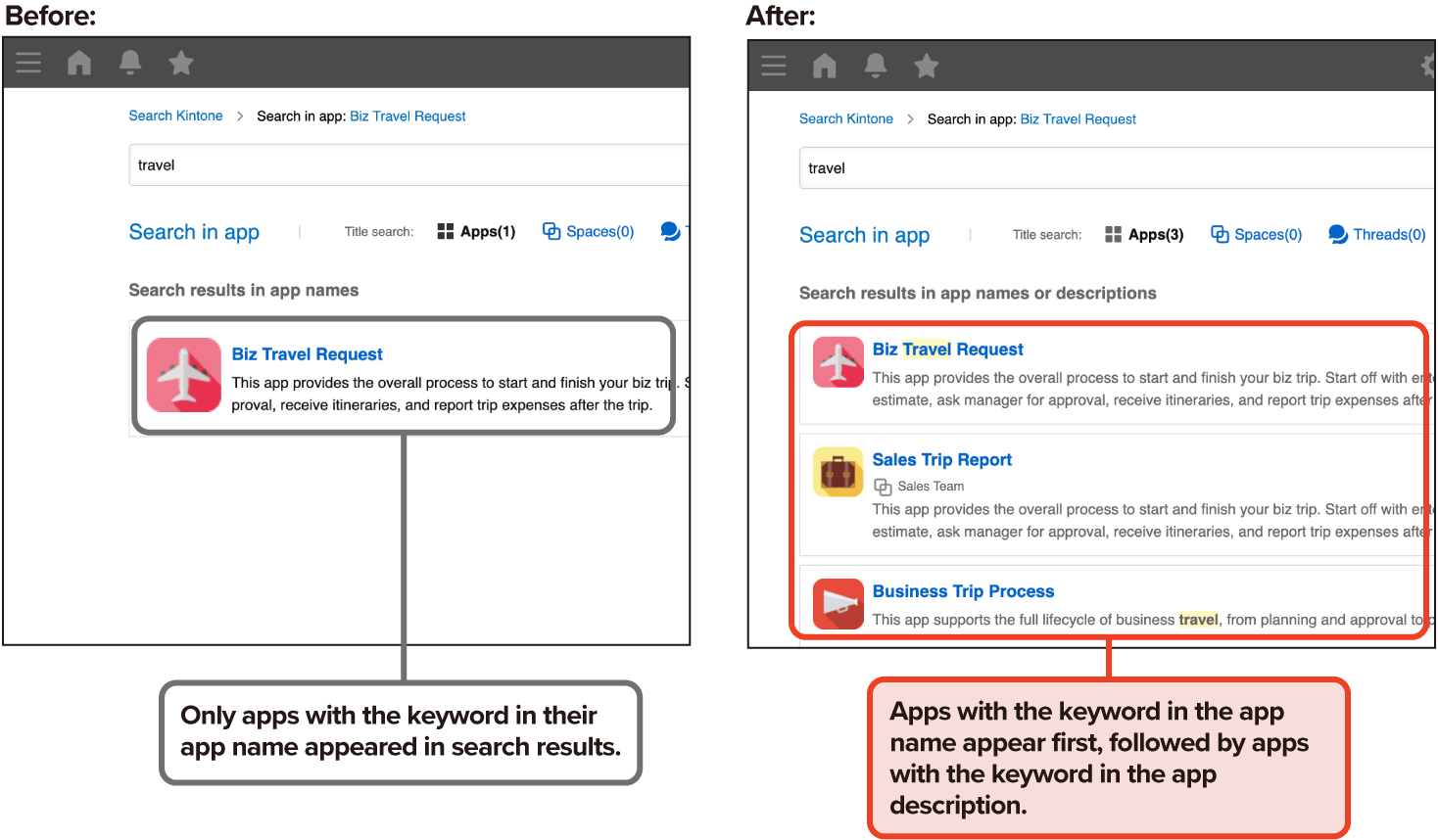
Discover More Apps with Enhanced Search
You can now search for apps by keywords in their descriptions—an enhancement to our previous system, which only allowed searches by app name.
This update makes it easier to discover relevant apps, even when name-based searches don’t return the results you’re looking for.
This feature was first announced as part of the January 2026 update, but its release has been postponed.
(Updated on January 6, 2026)
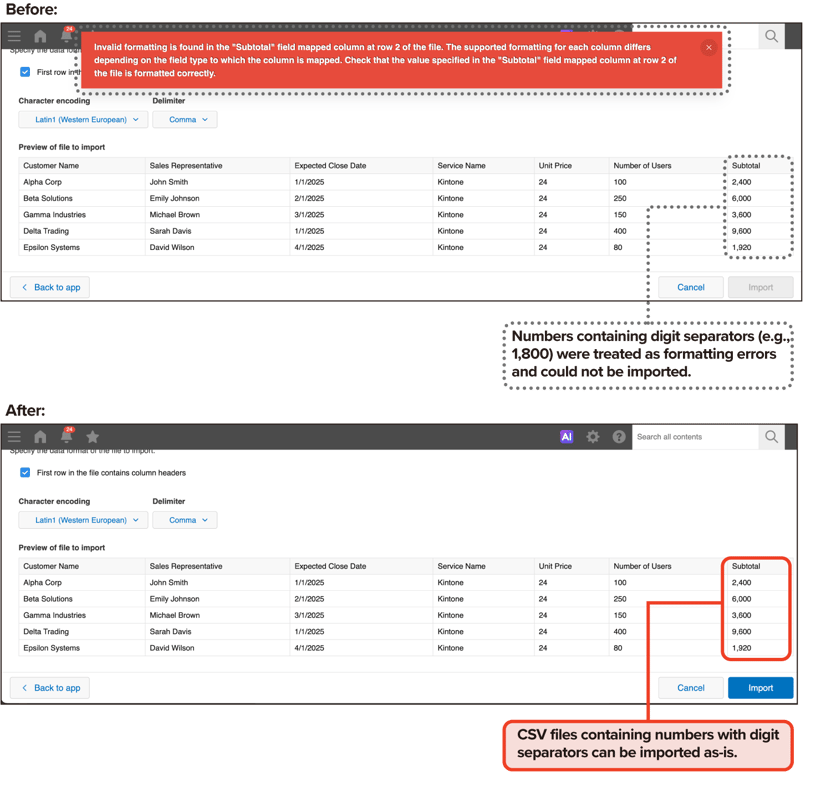
Import CSV Files with Digit Separators—No Extra Formatting Required
You can now easily import CSV files that contain digit separators in numerical values.
This improvement allows for seamless integration with external systems, ensuring compatibility regardless of how numerical values are formatted.
Note:
Currently, both commas and periods can be used as digit separators.
API Updates
Here are the latest updates to our APIs.
For detailed information on each update, head over to the Developer Network.
More Flexible Control of the "Change Assignee" Button
The JavaScript API now supports controlling the visibility of the Change Assignee button within Process management on the record details page in the PC version.
You can toggle the button between visible and hidden states and retrieve its current display status, allowing for more flexible use of Process management features.
The API also allows you to retrieve the current visibility status of each option, enabling more flexible control over the record list view.
Control Graph Switch Options
You can now use the JavaScript API to show or hide options in the graph switch component on the record list and graph page.
The API also allows you to retrieve the current visibility status of each option, enabling more flexible control over the graph view.
Retrieve Graph Lists
You can now retrieve the list of graphs on the record list and graph page via the JavaScript API.
When combined with the JavaScript API of Control Graph Switch Options, this makes it easier to manage graph display switching.
Record List Retrieval API Now Available on the Graph Page
The JavaScript API for retrieving record lists, introduced in the September 2025 update, is now available not only on the record list page but also on the graph page in the PC version.
Dialog, Notification Banner, and Loading Display APIs Now Available on Plug-in Settings Pages
The JavaScript APIs for displaying dialogs, notification banners, and loading indicators are now available on individual plug-in settings pages.
This makes it easier to handle user input and provide feedback directly within each plug-in’s settings page.
New Features Under Consideration
You can explore the new features the Kintone development team is working on. To test these features, go to Kintone Administration, select Update Options, and adjust the settings under New Features under Consideration.
You are invited to use the Help us improve Kintone option to share your feedback on these new features. Your insights are highly valued!
Please note that new features under consideration may undergo specification changes or be discontinued at any time, even outside regular maintenance periods.
Revamping the Front-End Foundation: Notifications Page
The Kintone development team is updating the front-end technology foundation that has been in use since the initial release.
These enhancements will improve layouts and components across multiple pages, including the Notifications page.
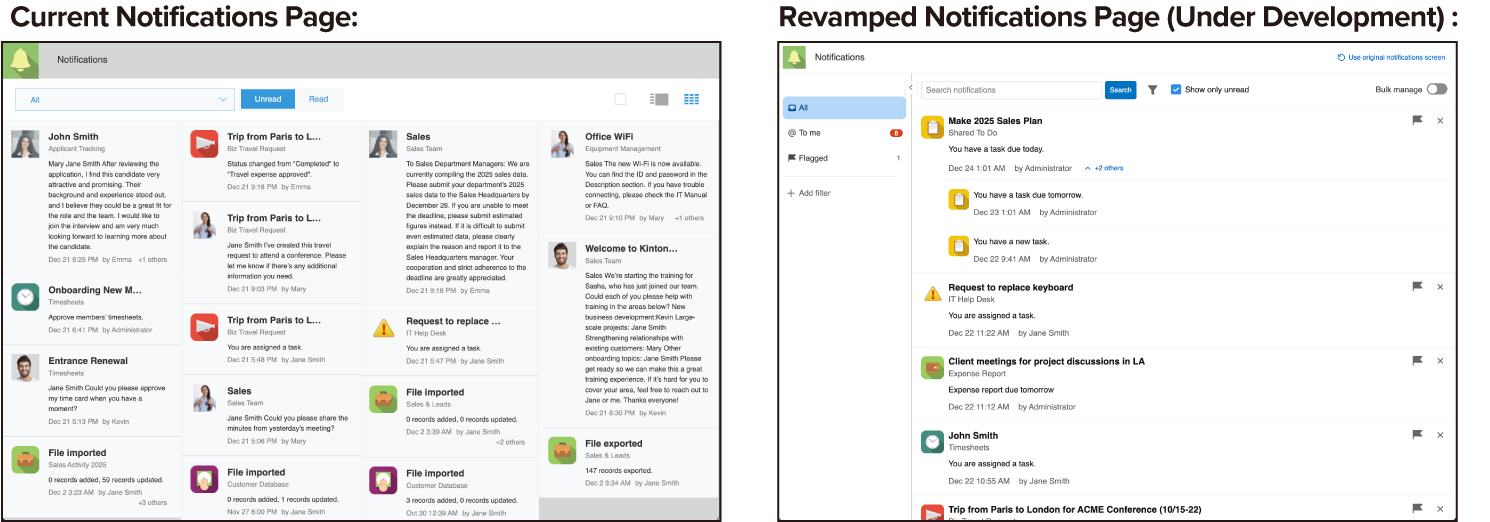
The front-end infrastructure for the Notifications page has been completely overhauled, and a new version is currently under development with updated designs and new functionality.
Once enabled via a New Features Under Consideration, a toggle button will appear on the existing Notifications page, allowing users to switch to the new interface.
This change will only apply to users who choose to enable the toggle, and users can revert to the previous interface at any time.
For a detailed explanation of the changes to the front-end architecture, please refer to the previous announcement about the App Settings Facelift.
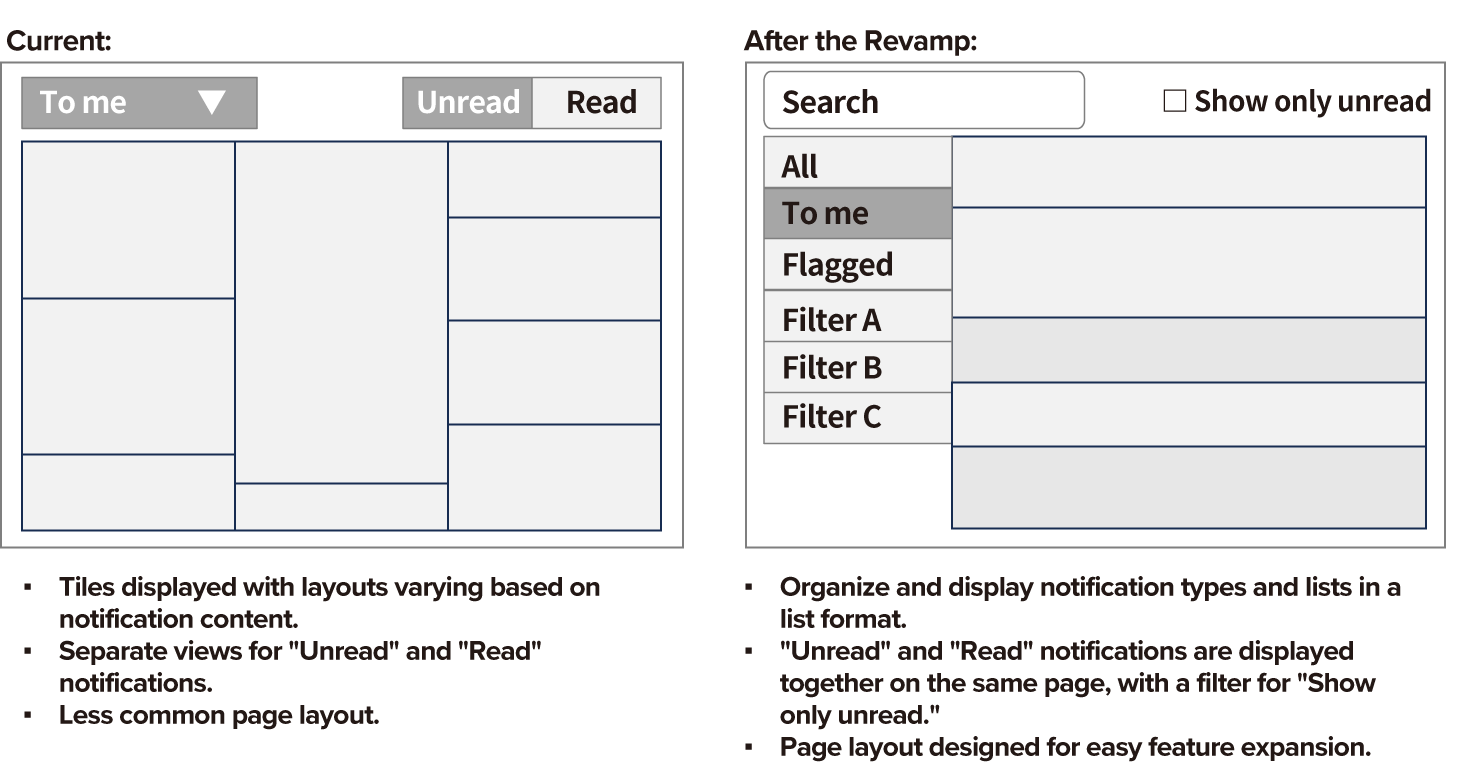
Updating Page Layout for Enhanced Usability
The page layout is being updated to create a more universal design. This improves functionality and reduces the learning curve for a broader range of users.
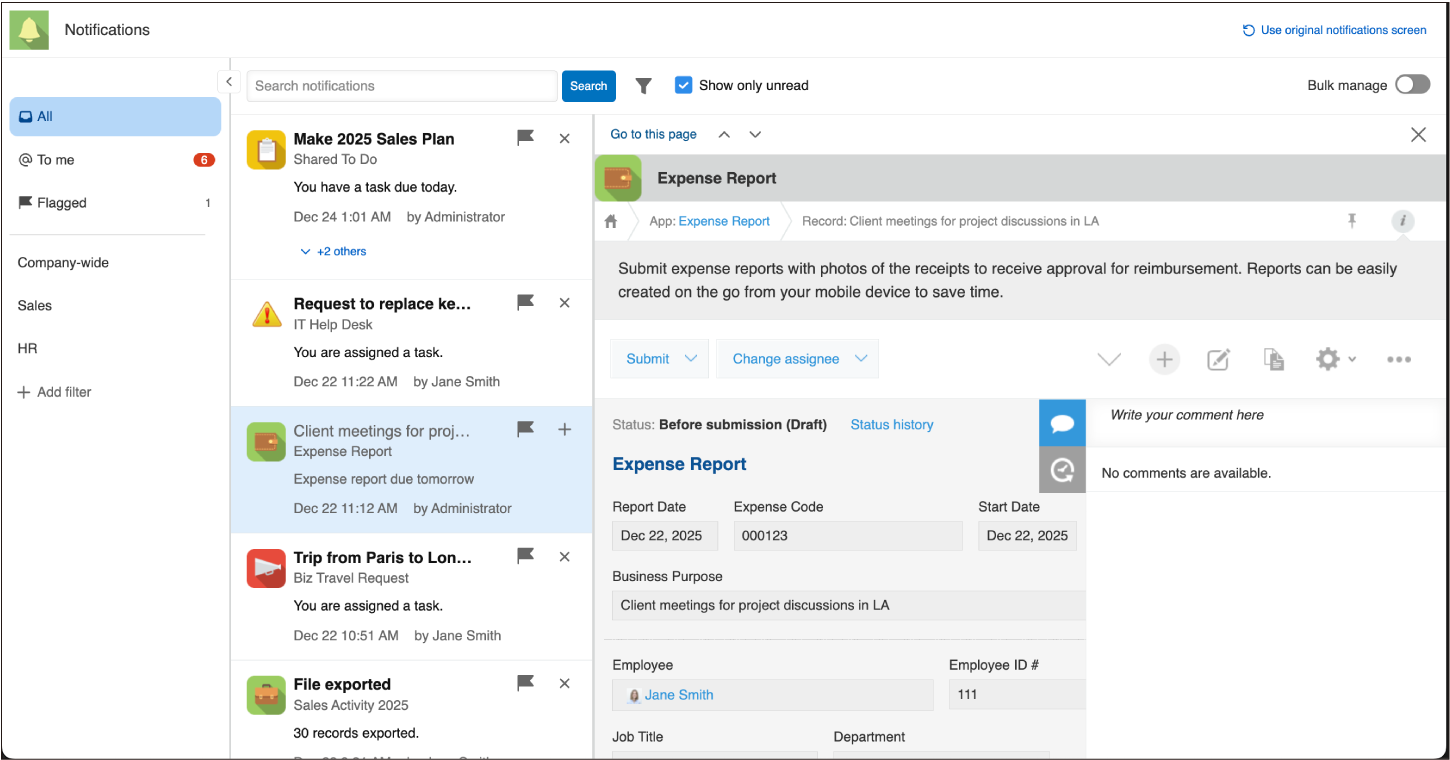
Switching Notification Types and Filters
The notification filter toggle appears in the left column of the page, allowing users to review notification content while switching between notification types and filters based on specified conditions.
Additionally, keeping the Show only unread option enabled ensures that only unread notifications are displayed, regardless of the active filter.
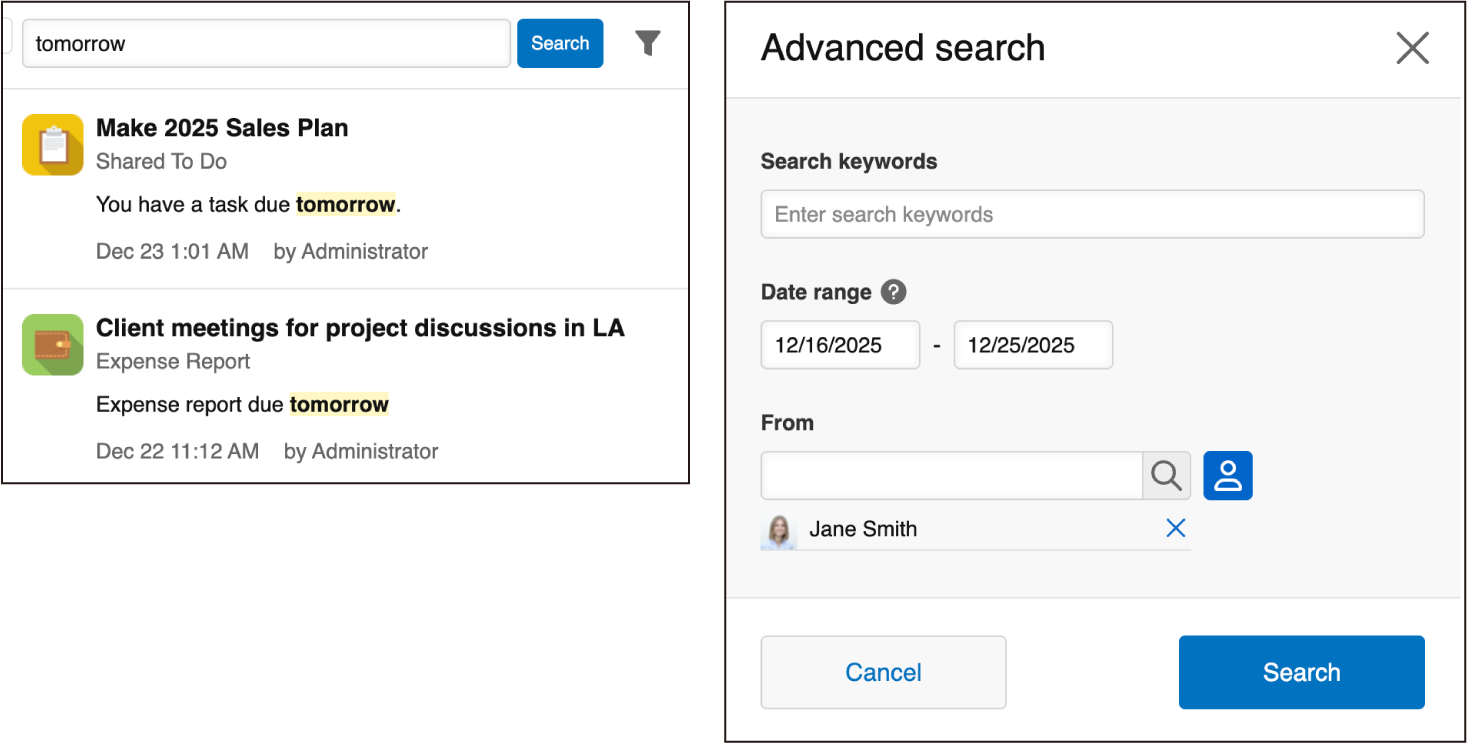
Notification Search Function
Users can quickly search notifications using keywords.
In Advanced search, users can refine results by keyword, date range, or From, which indicates the user who triggered the notification.
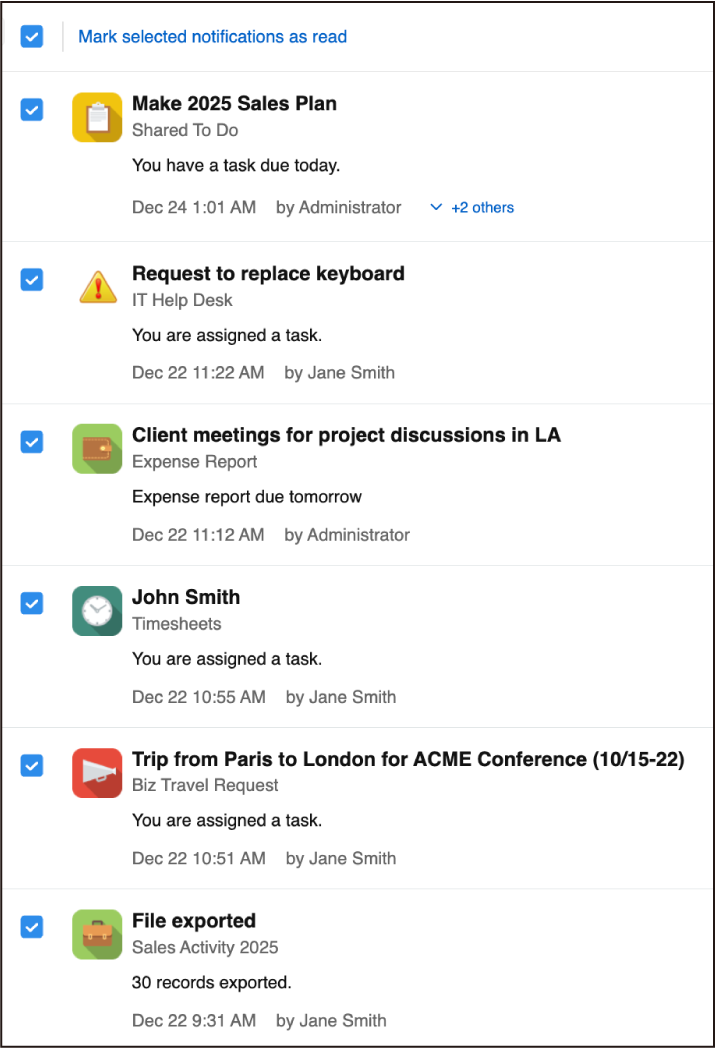
Batch Marking Notifications as Read
Users can select multiple notifications at once and mark them all as read, making notification management more efficient.
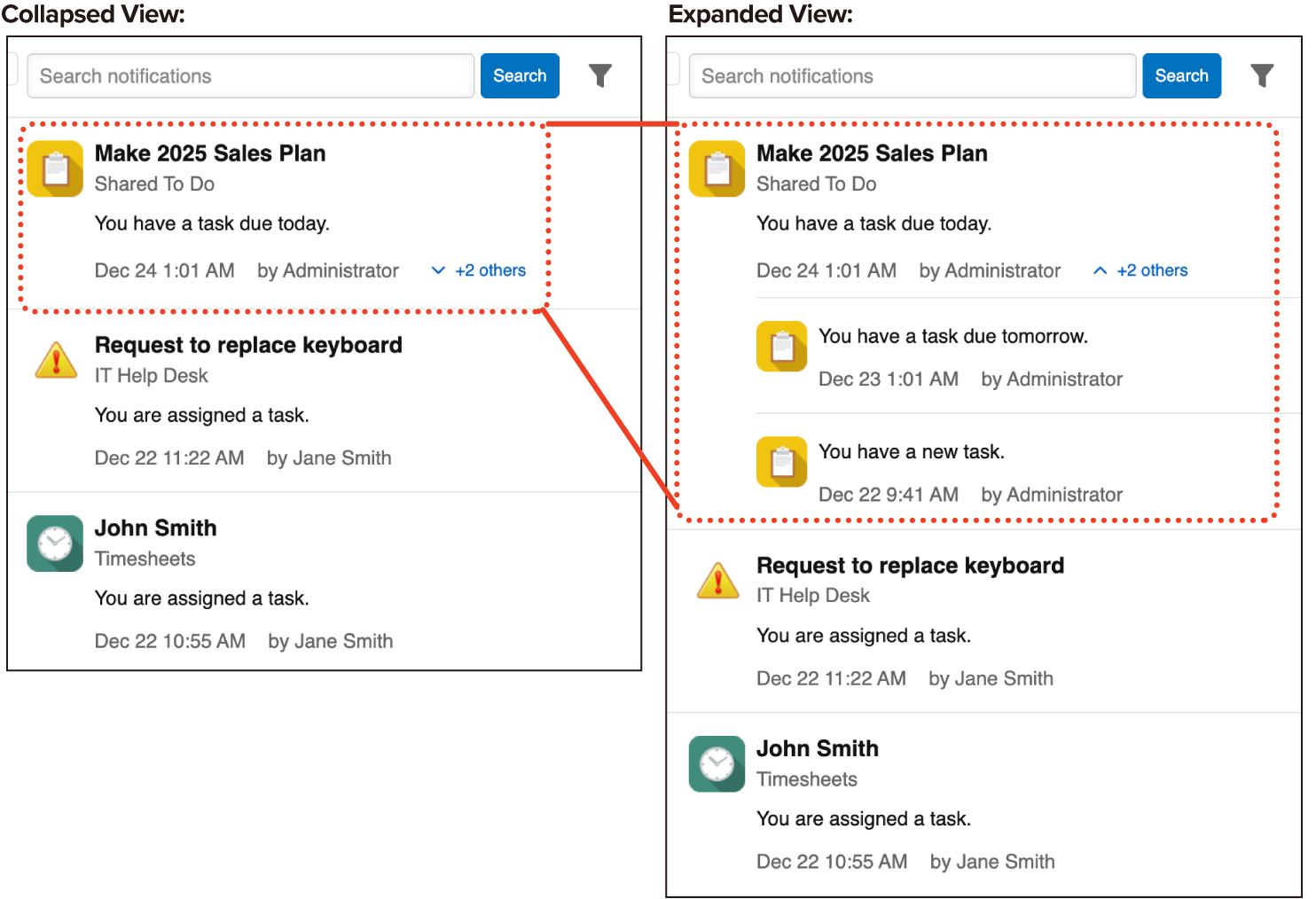
Expanding Grouped Notifications
Notifications grouped as "+N others" can be expanded with a single click, keeping the list compact while allowing users to view individual notifications when needed.
Update Options
Available Update Options
Update Options is a tool that allows administrators to control how Kintone updates are applied. Administrators can choose when to roll out updates to their team using the options.
To access Update Options, click the gear wheel to the left of the search bar and select Kintone Administration. Select Update Options under Other.
For January, the following features will be applied to the Update Options:
|
Option |
Available Feature |
Notes |
|
|
Disable New Features*
|
AI Thread Summary: Automatically Grab Key Points! |
This feature can be disabled until the February update is released
|
|
|
New Record Filtering Options for Attached Files in Kintone! |
|||
|
New "App Administrators" Column Enhances App Management |
|||
|
Easily View Current Assignees in Mobile! |
|||
|
AI View Analysis: AI-Powered Summary of Displayed Data |
|||
|
UK-Friendly Dates: DD/MM/YYYY Support Added |
|||
|
Decimal Commas: Support for Spanish & Portuguese Users |
|||
|
Clearer, Easier Dates in Spanish, Thai, and Brazilian Portuguese |
|||
|
• JavaScript API Updates (July–August 2025) |
|||
|
JavaScript API Updates – Sep to Oct 2025 |
|||
|
Quick File and Image Uploads |
|||
|
AI App Settings Review |
This feature can be disabled until the May update is released |
||
|
New "Import from file" page |
|||
|
New "Imported files" page |
|||
|
New and Expanded JavaScript API Features (December) |
|||
|
NEW |
|||
|
NEW |
|||
|
NEW |
|||
|
Preview New Features |
None |
||
|
New Features in Consideration
|
Kintone System Administration Gets a Design Infrastructure Update to Enhance Development Efficiency |
||
|
Revamp of the "Create from Excel" Page |
|||
|
NEW |
|||
* You can find the latest updates on the Update Options page in Kintone Administration. These updates may occur outside of regular updates.
A
*Monthly Channel
*


About the Author