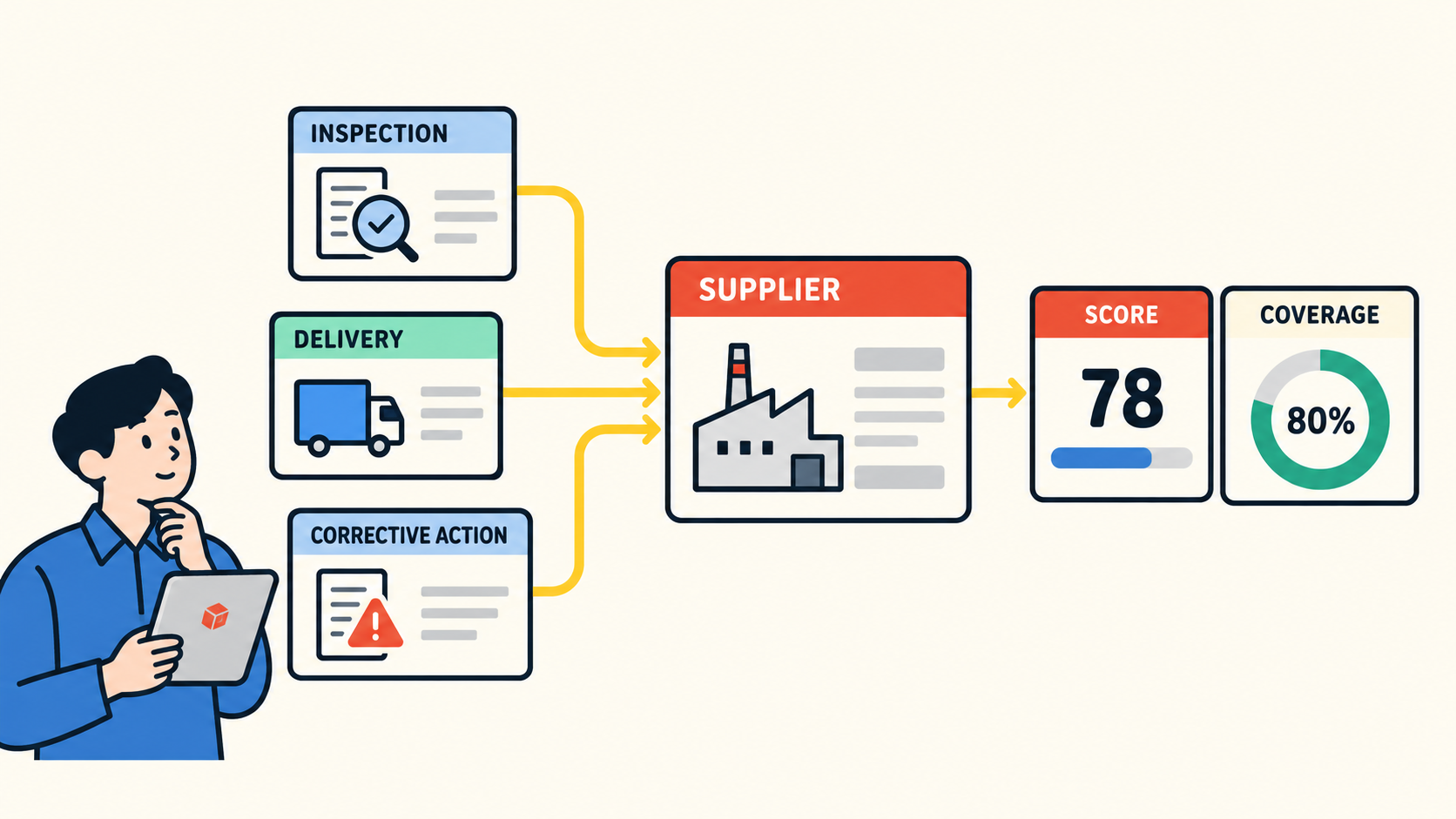



SMB operations management runs on a mix of tools. HR has a spreadsheet it has kept for years. Approvals happen in someone's inbox. IT, finance, and facilities each work in systems built for their own jobs. Every one of those tools does what it was chosen to do. The trouble lives in the work that crosses them: the request that changes hands, the approval that lands in one person's email, the next step that nobody picks up because everyone assumed someone else had it.
The fix is to centralize that crossing work and leave the rest alone. Give every piece of cross-department work one shared record that holds four things: who owns it right now, what has been decided, what happens next, and where it stands. HR keeps its data, IT its admin tools, and finance its accounting system. The shared record points to them and carries the coordination they cannot.
That record stays reliable only if a few rules come with it: decisions get made in one place, every handoff names the next owner, and someone is responsible for correcting the record when it disagrees with what happened. The rest of this article follows one new hire's onboarding from start to finish to show how that works, where it breaks, and how to test the same thing in your own operation this week.
The Friday Before Monday
The example in this article is illustrative. The company, people, and timeline are invented to show a common pattern.
A 120-person distribution company hires a sales operations coordinator who starts Monday. Four groups touch the onboarding, and each one works in its own tool.
HR adds the new hire to the onboarding spreadsheet: name, start date, department, role. The hiring manager gets an email asking her to approve a laptop and a standard software package, and she replies "Approved" on Tuesday. IT sets up the accounts in its own admin console. Facilities prints a building badge through its access-control system.
On Friday afternoon, Maya, the operations lead, checks whether everything is ready. The spreadsheet row says the equipment request is pending. She searches her inbox and finds nothing, because the manager's approval went only to the HR coordinator. She messages IT, which has the accounts set up but has not ordered a laptop, because nobody told IT the request was approved. Facilities says the badge is ready. Nobody can tell her who was supposed to tell IT.
Every tool in this story is accurate about its own piece. The spreadsheet correctly shows what HR entered. The email correctly shows the approval. IT's console correctly shows the accounts. What no tool shows is the whole onboarding: which decision is outstanding, who owns the next step, and whether the new hire will have a laptop on Monday. Maya spends the rest of the afternoon reconstructing that picture from four sources, and the answer is no.
Maya's setup is common. Among 353 small and midsize Kintone customers studied (500 employees or fewer) who described how they worked before Kintone, three in four listed spreadsheets, and more than one-third listed at least two when considering spreadsheets, email, and paper.
The common response is to look for one system that replaces all four. That is a large project aimed at the wrong target, since each tool is doing its own job well. What Maya's team needs is narrower: one place where the work that crosses those tools is owned, decided, and visible.
One Shared Record, Four Tools Kept
Start with what the onboarding needs to be coordinated. It needs a record that every group can find, that names the new hire and the start date, and that lists each step with its owner and status: approve equipment, set up accounts, order the laptop, issue the badge. It needs the approval decision recorded where everyone can see it, with who made it and when. And it needs one field that answers the question Maya spent Friday asking: what happens next, and who has it?
That is a short list. It does not include the new hire's salary, IT's account configuration, or facilities' access logs. Those stay in the systems built for them. Teams can share a record without sharing an application. IT keeps working in its admin console and facilities in its access system, and each marks its own task complete when the work is done, with a link back to its own system for the detail. (If you want the longer explanation of why a record, rather than a task, is the right unit for this kind of work, see What Kind of Software Is Kintone?.)
A single source of truth, with a defined scope
You have probably been told you need a single source of truth. Taken literally, that means moving every piece of HR, IT, and facilities data into one system and keeping it in sync, which is the replacement project this approach is meant to avoid. The useful version is smaller: one authoritative record for the status and ownership of the work, while each department's data stays where it already lives.
The discipline that makes this work is naming an owner for every important value. In Maya's onboarding, it looks like this:
|
Value |
Who owns it |
How the shared record holds it |
|
Start date and role |
HR |
Entered once at intake; HR updates it if it changes |
|
Salary and personal details |
HR |
Not on the shared record |
|
Equipment approval |
Hiring manager |
Decided on the shared record itself |
|
Account setup |
IT |
IT completes its task record, which links to its ticket |
|
Badge |
Facilities |
Facilities completes its task record |
|
Next action and its owner |
Operations lead |
Lives on the shared record and nowhere else |
The table also exposes the weak spots. Any value with two owners, or none, is where the next Friday afternoon will come from.
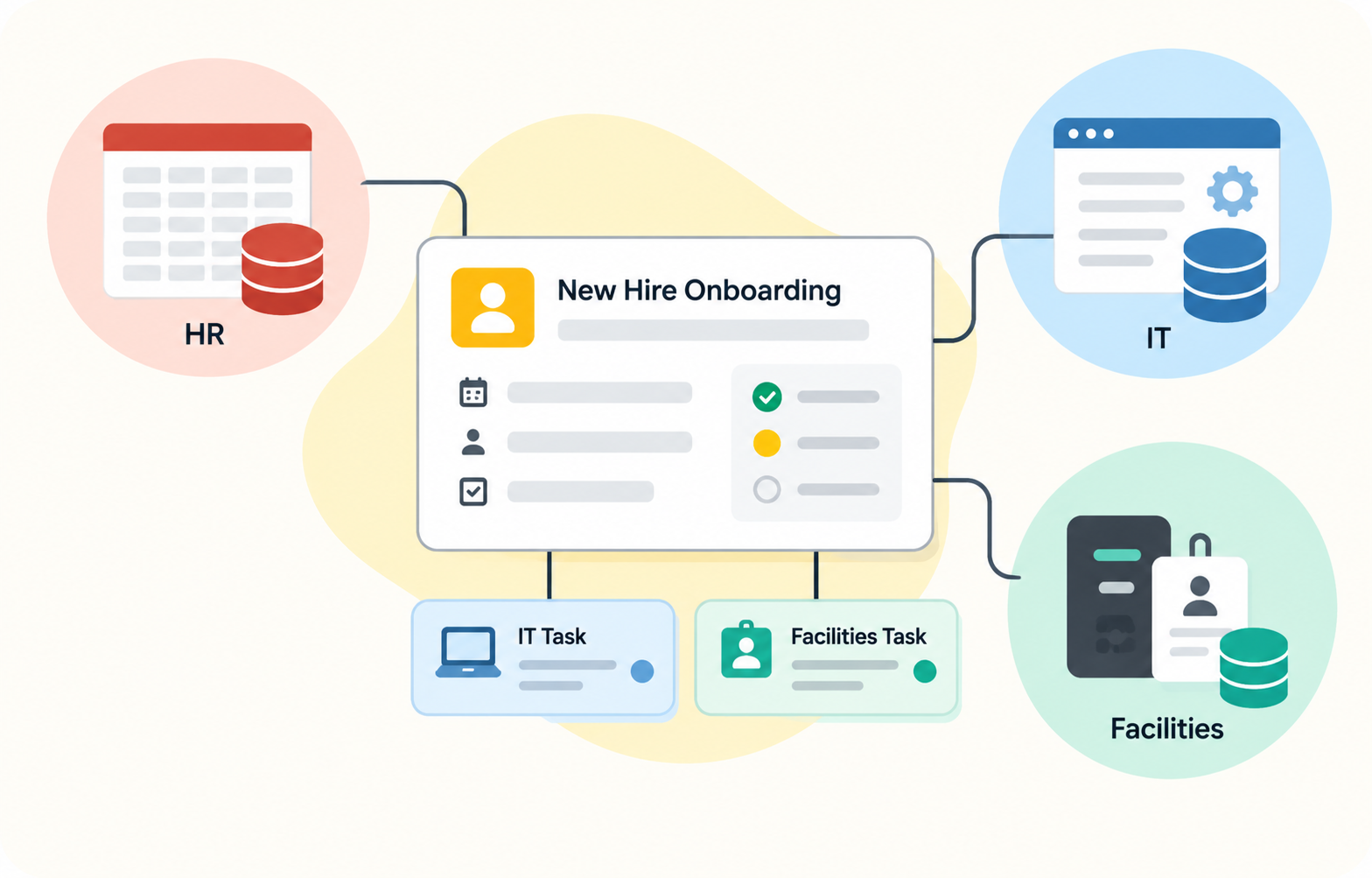
This is the kind of shared record operations teams build in Kintone, and one way to build it is with two connected apps. An Onboarding app holds one record per new hire, with the overall status and the approval decision. A Tasks app holds one record for each department's piece of work, such as IT's account and laptop setup or facilities' badge, each with its own owner and status, linked back to the onboarding it belongs to. Because each task is its own record, IT and facilities can work at the same time, and the onboarding record shows all of its tasks in one place through a Related Records field. What ties a task to its onboarding is a shared identifier: each task record carries the onboarding's ID, and the Related Records field is set up to show tasks with a matching ID. The field displays that relationship. It does not create it, so whoever creates a task is responsible for entering the right ID. A mistyped ID hides the task from its onboarding, so the person creating it confirms that it appears on the right record before moving on. A Link field on each task points to the ticket or entry in the department's own system. The data each department owns stays in that department's tool. The records carry the coordination.
Where Accountability Disappears: The Handoff
Look again at Friday. Nobody dropped a task: the manager approved, IT set up the accounts, and facilities printed the badge. The failure happened between tasks, at the moment the approval should have become IT's next job.
That moment has two parts, and it is easy to manage only the first. One person finishes a step. A different person learns that the next step is theirs and that they can start. In Maya's onboarding, the manager finished her step when she replied to the email. IT never received the second half, so as far as IT knew, there was nothing to start.
A handoff is complete only when the record names the next owner and that person knows. Three rules make that true:
- Every step change names who has it next. Marking something done without naming the next owner leaves the work in a gap.
- The next owner hears about it from the record. The approver should not have to remember to forward an email to IT.
- Open work shows up where its owner already looks. If IT has to go searching for onboardings that might need them, some will be missed.
In Kintone, this is what Process Management is built for, and it works at the level of each record. The onboarding record moves through a short sequence of statuses: Equipment Review, Setup, and Ready. When the manager takes the Approve action, the onboarding moves to Setup and is assigned to the HR coordinator, whose job at that point is to make sure each department's task exists, carries the onboarding's ID, and has the right owner.
Each task record then has its own statuses and its own assignee, so IT's task sits in the IT lead's list of records waiting on them while facilities works its badge task in parallel. Kintone can notify each assignee when a task is assigned to them. A notification only signals that work arrived. An email can go unread. What makes the handoff hold is that the task has a named owner and stays visibly open, on that owner's list and on the onboarding record, until someone acts on it.
The last step is a human decision. Before taking the Mark Ready action, the operations lead checks two things on the onboarding record: that every required task exists, and that each one is complete. A task that was never created is still outstanding work, even when every task visible on the record shows complete. The handoff no longer depends on someone remembering to forward an email. It depends on named owners, open work anyone can see, and one person accountable for calling the onboarding done.
The same setup answers a quieter question: is this task finished, or is it waiting on someone? A task that sits open with no recent activity is a different problem from a task with no assignee at all, and the records show which one you have.
When the Request Comes Back
Now run the same onboarding with the shared record in place and add a complication. On Wednesday, IT opens its setup task and notices a mismatch. HR entered the role as "Sales." The new hire is joining Sales Operations, which needs reporting tools and CRM administrator access the standard sales package does not include. IT cannot order the right software until someone confirms the role.
In the old process, this is where work vanishes. IT replies to whichever email it has, the question waits in an inbox, and on Friday the spreadsheet still says "pending" with no hint that the request is stuck on a question about the role.
A returned request needs an owner as much as a forwarded one. The role belongs to HR, so the correction belongs to HR. On its task record, IT takes a "Return for correction" action, which moves the task to a Needs Correction status and assigns it to the HR coordinator. IT's question goes in the task's comments, where the coordinator, the manager, and Maya can all read it. HR fixes the role on the onboarding record, sends the task back to IT, and IT orders the right package.
Two things changed. The question has a named owner the whole time it waits, so it cannot stall unnoticed. And anyone who checks the record on Friday sees where the onboarding is and why, without sending a single message.
Build the backward path into the process on purpose. A process that only shows the path forward teaches the team nothing about the days when the path goes backward, and those are the days the onboarding is most likely to slip.
The Approval That Happened Somewhere Else
The shared record's real test comes next. Maya's team writes one rule before anything else: an equipment approval counts when the approver takes the Approve action on the onboarding record. If the approver is unavailable, the HR coordinator may record the approval on her behalf, but only with her written confirmation, and the coordinator notes where that confirmation came from. The delegation rule is the team's policy. Whoever configures the app sets who is allowed to take the Approve action so the permissions match it. Kintone emails the manager a notification that the request is waiting, with a link to the record.
She reads the email on her phone between meetings and replies "Approved."
The reply goes to a notification address, or to the HR coordinator, or nowhere useful. The record still reads Equipment Review. IT sees nothing new. The onboarding is back to the Friday problem, and the shared record is now wrong without anyone knowing.
The shared record cannot fix this on its own. Kintone does not read email replies and turn them into approvals, and it does not judge whether an email counts as one. The team's rule does that. Under Maya's rule, the reply shows what the manager intended, but it has not authorized anything yet. And no rule written in a process document will stop a busy manager from answering an email. What prevents the damage is a reconciliation rule the team agrees on before it happens. Every shared record needs answers to three questions:
- Who notices? Someone has to see that the record has not moved. Give the approval step a due date, and set a reminder notification to fire on that date if the record is still in Equipment Review. The reminder shows only that the record is still pending. It cannot tell anyone whether the manager approved somewhere else, so its job is to prompt a person to find out. The HR coordinator checks, finds the email reply, and asks the manager to take the Approve action, or records it under the delegation rule with her written confirmation.
- Who corrects it? The person who owns the decision takes the action on the record. If the team allows a delegate to record an approval on someone's behalf, the delegate notes where the approval came from, and the record's change history shows who made the update and when.
- Which record wins? The shared record. An email reply shows what the manager intended. Under the team's rule, the decision counts when it is recorded on the onboarding. Until the record moves, IT does not start.

The same three questions cover every way a shared record drifts:
- A field goes stale. The start date moves to the following Monday. HR owns that value, so HR updates the record, and the change is the trigger for IT and facilities to check their timing.
- Someone acts outside the workflow. IT orders a laptop on a hallway conversation. The record still says Equipment Review. The rule says IT waits for the record, or records the exception with a reason.
- A linked source changes. IT reopens its account ticket. The link still points to it, but IT's task record says complete. The task's owner is responsible for keeping its status honest.
- An integration fails. If the team later connects tools so data moves automatically, a failed sync creates a mismatch nobody sees. Someone has to own checking it.
Shared work, limited access
An onboarding record crosses HR and IT, and HR data carries obligations IT does not need to share. The record should hold only what each group needs to act. Salary stays in HR's own system. Personal contact details, if they appear at all, stay visible only to HR. Kintone handles this with permissions at the app, record, and field level, so IT can see and update its own tasks without seeing fields that belong to HR. Shared status works because everyone sees the status, and only the right people see the rest.
Automate What the Team Has Already Decided
Once the record and its rules are in place, automation starts paying off. Workflow automation for small business teams is most useful in the spots where Maya's onboarding used to depend on someone remembering:
- A notification goes to the IT lead the moment IT's task is assigned.
- A reminder fires when an approval passes its due date.
- The assignee changes automatically when the record moves to its next status.
- Requests take a different route based on a field value. In Kintone Process Management, an action can depend on conditions, so an onboarding for a role that needs administrator access can route through an extra security review while standard roles skip it.
Each of those automations runs on a decision the team made first. The routing rule only works because someone decided which roles need a security review. The reminder only works because someone decided what "overdue" means for an approval. Automate a step before that decision exists and you get fast, consistent execution of a rule nobody agreed to.
In the onboarding, one step is ready to automate and one is not. Notifying IT when its task is assigned is ready: the rule is clear, it never changes, and a person adds nothing by forwarding it. Deciding which software package a new role gets is not ready. HR, IT, and the hiring managers have never written that down, which is why the Sales versus Sales Operations mismatch happened at all. That step needs a short table of roles and packages, agreed by the people who own it, before any rule can enforce it.
A useful test before automating any step: can the team explain when the rule applies, who makes the decision, and what happens when an exception occurs? Conditions and exceptions are normal. A rule nobody can explain is the one that is not ready.
What Maya Sees on Friday Now
A few weeks later, three people start on the same Monday. On Friday afternoon, Maya starts with a list view of the Onboarding app, filtered to next week's start dates and sorted by status. She opens each onboarding that is not yet Ready to look at its related tasks. A second view, in the Tasks app, shows every open task for those onboardings by department, so she can spot a backlog that no single onboarding record would reveal.
- One onboarding is Ready. Maya reviewed its completed tasks and marked it Ready on Thursday.
- One is in Setup. Facilities finished the badge task. IT's task is still open, assigned to the IT lead, with the laptop ordered and a delivery date on the task.
- One is in Equipment Review, past its approval due date. The reminder has already gone out, and the HR coordinator is checking with the hiring manager.
The view tells Maya where things stand, and it gives her a starting point for asking why. A visible condition shows that something needs attention and leaves the cause to be found, so each one prompts a different first question:
|
What the record shows |
Possible causes |
Where Maya starts |
|
A task with no assignee |
A step the process never assigned, or an owner who left the role |
Assign it, then check whether the process gives that step an owner every time |
|
A decision past its due date |
An unavailable decision-maker, missing information, or unclear authority over the decision |
Ask the decision-maker what the request is waiting on before sending another reminder |
|
Records returned for correction again and again |
Unreliable intake information, or requirements nobody has written down |
Look at what the returns have in common, such as the missing roles-to-packages table |
|
One department's tasks consistently open longest |
Capacity, competing priorities, or tasks that arrive without what the team needs to start |
Talk with that team's lead about which one it is |
That last column is why the record matters more than any reminder. A pile of notifications treats every delay the same way. A record with owners, statuses, and history gives an operations lead the evidence to investigate whether a delay comes from a person, the process, or information that arrived incomplete.
It also gives Maya a way to measure whether the change worked. She can compare a few things before and after: how many onboardings get returned for correction, how many approvals pass their due date, and how often she still has to reconstruct status from email. Those numbers come from her own records, and they show whether the new arrangement is reducing the Friday scramble.
What This Looks Like at a Real Organization
Zoom Counseling & Rehab, a counseling center in Dallas, shows the same pattern in a different setting. When its story was published, the center had four office staff supporting 32 counselors and more than 600 clients. The business office manager, who oversees schedules, client records, and reporting, had been printing 627 pages every week, one for each client, to keep the office running.
The center moved that office coordination into Kintone, and the office manager describes Kintone as the office's "one-stop shop." Billing is the detail that matters for this article. In the published story, billing stays in a separate system, and the planned next step at the time was a scheduling app that would bring nearly all of the remaining office operations into Kintone.
That is the approach this article describes, carried out by a real team: the coordination work moved into one shared place, and the specialized tool that did its job well stayed where it was. Your departments and tools will differ. The decision is the same one.
Test One Process This Week
You can check any cross-department process against five questions without buying anything. Pick one process that regularly makes someone ask "where is this?" Onboarding, purchase requests, customer escalations, and equipment repairs are common candidates. Then walk one recent example through these checks.
|
Check |
Question |
If the answer is no |
|
Record |
Can every team identify the same request? |
Each department is tracking its own copy. Create one shared record with one ID. |
|
Authority |
Do we know which system or person owns the current decision? |
Decisions are happening in several places. Pick the one place where decisions count. |
|
Ownership |
Is one person accountable for the next action? |
Work is waiting between teams. Assign an owner at every handoff. |
|
Status |
Can the next person see what is done and what is still open? |
People are rebuilding status from email. Put the status on the record. |
|
Continuity |
Does the work keep its history and next owner when it crosses tools? |
The trail resets at each tool. Keep the history on the shared record and link out to the rest. |
Maya's original onboarding fails all five. Every team could find its own copy of the new hire, but not the same one. The approval lived in an email. Nobody owned the step between approval and IT. Status had to be rebuilt by hand. And whatever history each tool kept stopped at that tool's edge.
Your process may fail only one or two. That is the value of the test: each failed check points to a specific fix, so you start with the problem in front of you.
Keep, Centralize, Link, Integrate, or Replace
When the test turns up a problem, every piece of the process gets one of five decisions. Maya's team made them like this:
- Keep the tool for its specialized job. IT's admin console, the access-control system, and HR's records all stayed. Each one does work the shared record should never try to do.
- Centralize the owner, status, decision, and next step. These moved to one onboarding record and its linked task records, because they are the pieces that crossed departments and kept going missing.
- Link to detail that lives elsewhere. Each task record links to IT's ticket or facilities' entry instead of copying it, so the detail stays current in the system that owns it. A link keeps the detail findable. It does not update the shared record when that system changes, which is why each task's owner keeps its status honest.
- Integrate when two systems must exchange data on their own, often and in volume. Maya's team decided against it for now. Volume is one factor, and their onboardings are infrequent. They also weighed how time-sensitive the data is, what a manual error would cost, how sensitive the HR data is, and who would maintain a connection once it existed. A single manual entry at intake, owned by HR, came out ahead. A team with more hires, tighter deadlines, or costlier errors could weigh the same factors and reach the opposite answer.
- Replace a tool that no longer does its job. The onboarding spreadsheet was the one tool that went. Its only job was tracking the cross-department steps, so the team turned it into a shared database that carries owners and history with every record.
The line between linking and integrating deserves the most thought. A shared workflow is enough when people can keep the record current as part of their normal work, the volume is manageable, and a short delay between a change in one system and an update on the record does no harm. An integration becomes worth its cost when the same data has to move between systems many times a day, when manual updates keep getting missed, or when a delay causes real damage. Even then, someone has to own the connection, because a failed sync looks exactly like a correct record until someone checks.
If working through this shows that one of your existing tools cannot carry its part of the work anymore, that is a software decision, and it deserves its own process. Our guides on what operations management software should actually do for a growing company and how to evaluate workflow management software for an operations team cover that ground. When you are ready to compare tools, start with our look at the best workflow management software for growing SMB operations.
The Work Between the Tools
Maya didn't need to replace the systems handling HR data, IT accounts, or building access. She needed to replace the disconnected way those teams coordinated the onboarding. The Friday scramble came from the space between the tools, where an approval was supposed to become IT's next job and nobody owned the transfer. One shared record, a named owner at every handoff, one place where decisions count, and a rule for fixing the record when it drifts closed that space without replacing anything that was working.
Pick one process. Run the five checks. Fix the first one that fails.
If you want to see what a shared onboarding record, or any other cross-department process, looks like in Kintone, talk with a Kintone expert about the process you tested.


About the Author