


June Kintone product updates will take effect on June 14, 2026.
Overview
New and improved features
- OR search is now available in all-content search, in-app search, and space search
- Record delete success events are now available for the view screen and the "Record details" screen
- Front-end infrastructure renewed for mobile: header / global navigation bar / notifications list
Other updates
-
AI View Analysis is now available on the Kintone mobile app (iOS/Android)
- The AI icon is now always displayed in the global navigation bar for Kintone administrators and Users & system administrators
New features under consideration
-
Front-end infrastructure renewed for space and thread screens
-
Front-end infrastructure renewed for the "Create a Kintone app from a CSV file" screen
Update options
New and improved features
OR search is now available in all-content search, in-app search, and space search
The Search all contents, Search in app, and Search in space features now support OR search, which matches any of multiple keywords. This lets you find all results containing any of those keywords in a single search.
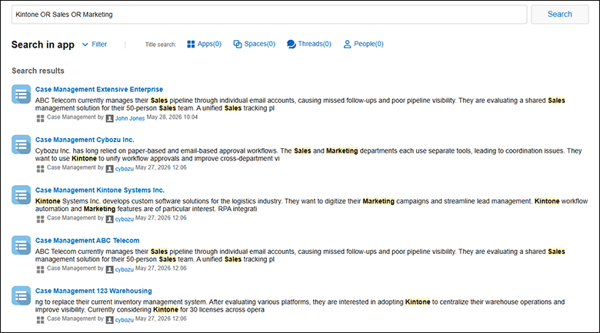 Example of OR search in app
By connecting multiple keywords with "OR", you can get results that contain any one of those keywords.
Record delete success events are now available for the view screen and the "Record details" screen
An event now fires when a record is successfully deleted from the view screen or the Record details screen. This enables customizations such as syncing records across apps and deleting related records, while preventing data inconsistencies caused by failed deletions.
Events that fire when a record is successfully deleted
| View screen (PC) | app.record.index.delete.submit.success |
| Record details screen (PC) | app.record.detail.delete.submit.success |
| Record details screen (mobile) | mobile.app.record.detail.delete.submit.success |
Note
- Bulk deletion from the view screen is not included.
For details, see the API updates (June 2026) page on the Kintone Developer Program.
Front-end infrastructure renewed for mobile: header / global navigation bar / notifications list
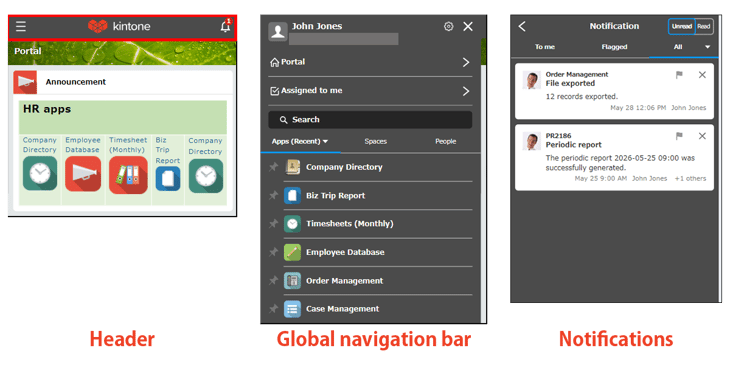
The Kintone development team is progressively renewing the front-end technology foundation that has been in use since launch, with the aim of accelerating product improvements. In this release, the infrastructure for the header, global navigation bar, and notifications list — shared across all mobile screens — has been renewed.
For details on the front-end update initiative, see the February 2023 Product Updates page.
Before
After
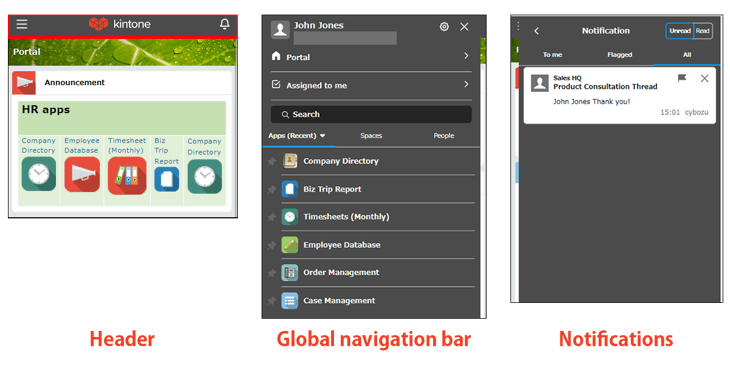
Note that the screens above are under development.
Other updates
AI View Analysis is now available on the Kintone mobile app (iOS/Android)
On the iOS and Android Kintone mobile apps, AI View Analysis — which analyzes and summarizes data in views — is now available. Going forward, users can also leverage AI from mobile to perform topic analysis, identify distinctive records, and create summaries from information aggregated in their apps.
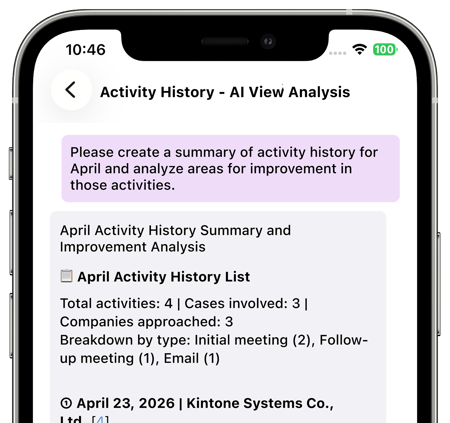
Note
- Using this new feature requires updating the mobile app.
- The update including this feature is scheduled for distribution during June.
The AI icon is now always displayed in the global navigation bar for Kintone administrators and Users & system administrators
For Kintone administrators and Users & system administrators, the AI icon is always displayed in the global navigation bar, regardless of whether Kintone AI is enabled or disabled.

For users other than administrators, the AI icon is displayed only when Kintone AI is enabled.
New features under consideration
Below are features currently under consideration. You can try these features by enabling them on the Update options screen in Kintone administration. We welcome your feedback on these features. Please submit feedback via the Help us improve Kintone form.
Note that features under consideration may undergo specification changes or have their availability on the Update options screen started/ended at any time, not just during scheduled maintenance.
Front-end infrastructure renewed for space and thread screens
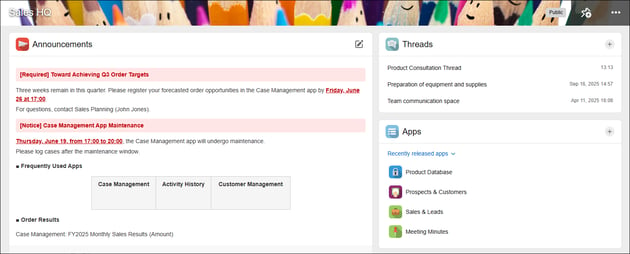
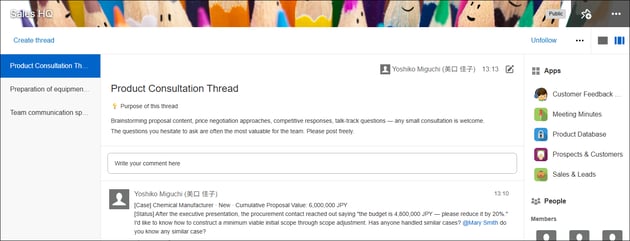
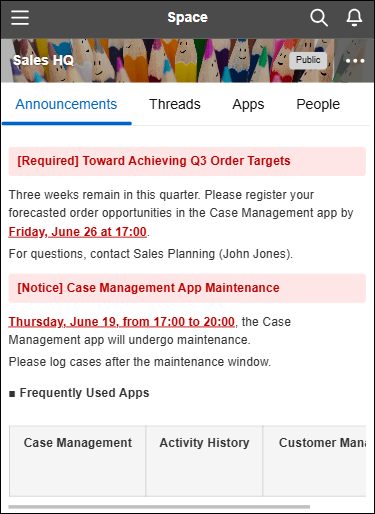
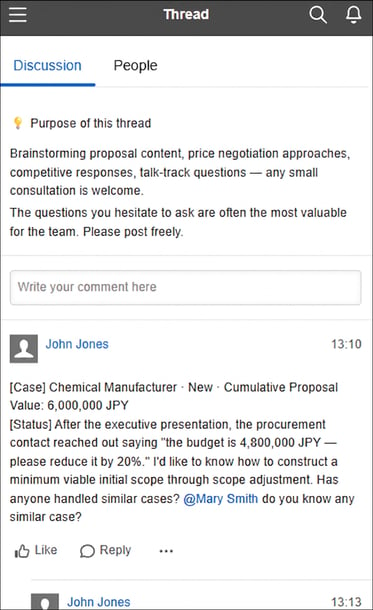
The Kintone development team is progressively renewing the front-end technology foundation across various screens, with the aim of accelerating product improvements. In this release, the front-end infrastructure for the PC and mobile space and thread screens has been renewed, with some layout and component changes applied.
For details on the front-end update initiative, see the February 2023 Product Updates page.
PC — space
Before
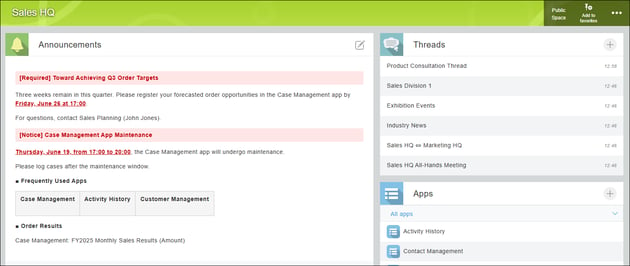
After (Screen is under development)
PC — thread
Before
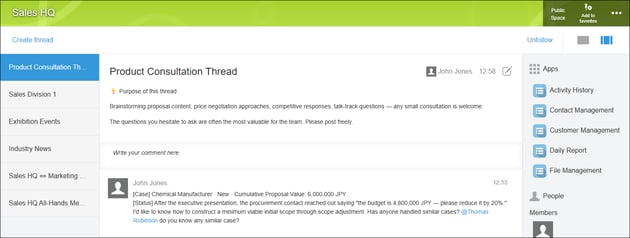
After (Screen is under development)
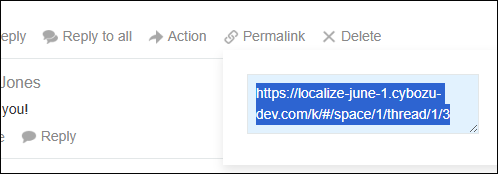
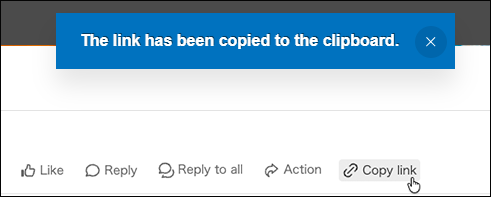
The method for copying post links has changed.
Before
Manually copy the URL displayed after clicking the Link button.
After
Copy directly using the Copy link button.
Mobile — space
Before
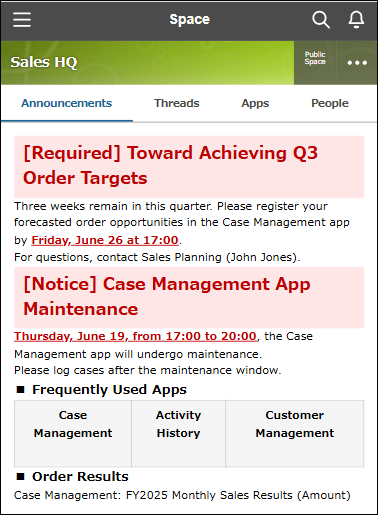
After
Mobile — thread
Before
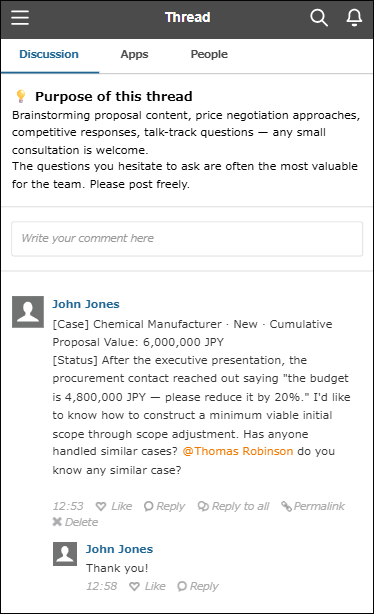
After
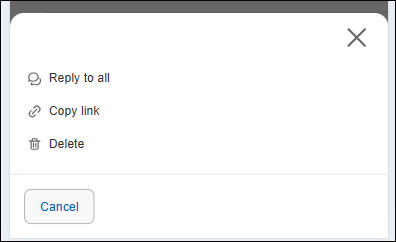
The methods for Reply to all, copying links, and deleting posts have changed.
Before
Tapping the post area displays the action menu.
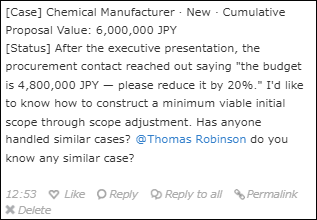
After
Tapping "…" displays the action menu from the bottom of the screen.
Updates to the space portal's announcement editor
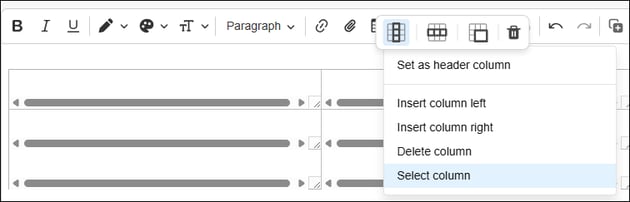
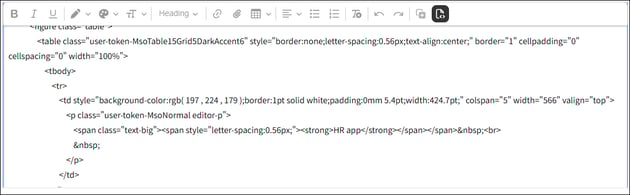
With the renewed space and thread body text editor, the following new editing operations will be available.
Previewing an app on the edit screen when attaching it
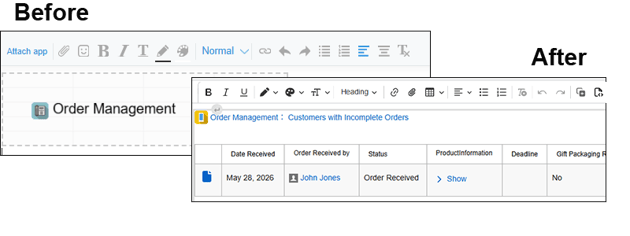
Adding and editing tables
Editing HTML source
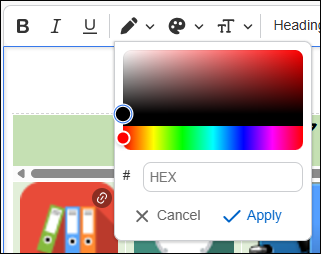
Flexibly setting text color and background color
Front-end infrastructure renewed for the "Create a Kintone app from a CSV file" screen
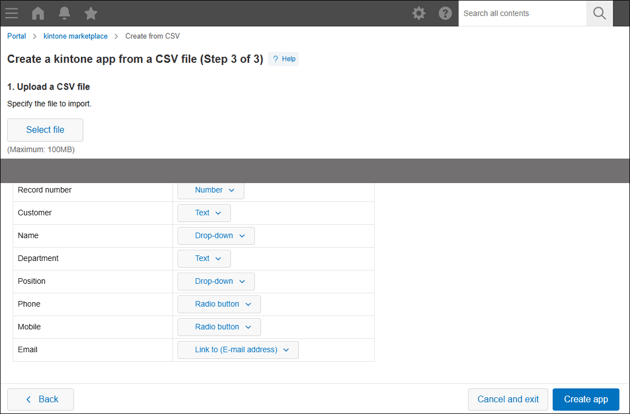
The Kintone development team is progressively renewing the front-end technology foundation across various screens, with the aim of accelerating product improvements. In this release, the front-end infrastructure for the Create a Kintone app from a CSV file screen in the marketplace has been renewed, with some layout and component changes applied.
For details on the front-end update initiative, see the February 2023 Product Updates page.
Before
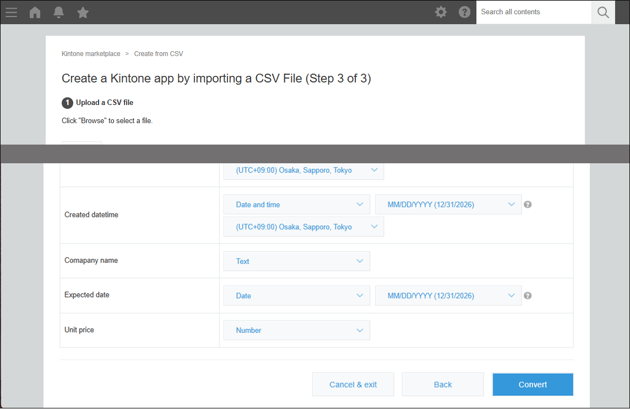
After (Screen is under development)
An all-content search REST API for Kintone is now available
All-content search in Kintone can now be performed via REST API. This API enables cross-app use of data accumulated across departments and business processes in Kintone. For example, you can search across all of Kintone, not just within individual apps. It also allows generative AI to reference a wider range of data stored in Kintone, making it easier to achieve better outcomes from AI-powered workflows.
We will continue to improve and expand search conditions and results. Feedback on this API can be submitted via the Help us improve Kintone form.
| REST API for all-content search | POST | /k/v1/search.json |
For details, see the API Lab page: https://cybozu.dev/ja/kintone/docs/api-lab/rest-api/search/search-data/ (Only available in Japanese)
The Kintone MCP server now supports all-content search in Kintone
The Kintone MCP server now supports all-content search, enabling cross-app search of a wide range of content in Kintone — including records, record comments, spaces, threads, and attachments — without having to specify an app. By selecting context-relevant information from search results, the AI improves the accuracy of source information, which in turn enhances the quality of AI outputs.
Examples of AI instructions
- AI summarizes past interaction history — e.g., "Summarize the past interaction history for Company A."
- AI retrieves similar past cases — e.g., "Show me any past cases similar to this one."
- AI finds thread discussions on a specific topic — e.g., "Find threads where the price revision was discussed."
- AI reviews attachment contents — e.g., "Check whether the contract template includes a confidentiality clause."
Note
- To use this feature, you must enable REST API for searching across Kintone from the API Lab on the Update options screen.
- You also need to update the Kintone MCP server to the latest version. Downloads and release notes for the Kintone MCP server are available from the Releases page for Kintone mcp-server.
Update options
Update Options is a tool that allows administrators to control how Kintone updates are applied. Using the options, administrators can choose when to roll out updates to their team.
To access Update Options, click the gear wheel to the left of the search bar and select Kintone administration. Select Update options under Other.
Available update options
| Option | Available feature | Note |
| Disable new features | Ability to use partial match search for records in "Lookup" fields | Can be disabled until the August 2026 scheduled update is released. |
| Export record comments | ||
| Ability to use "App", "Space", "Assigned to me", and "Notifications" widgets on additional portals | ||
| Ability for Kintone administrators to prohibit granting the "Manage app" permission to the "Everyone" group | ||
| Assigned to me widget for the mobile app (Android) | ||
| Enhanced JavaScript API support (March–April 2026 versions) | ||
| Ability to exclude keywords in search | ||
| Increase the number of viewable entries in "App settings history" to 1,000 | ||
| Display number of users with access on "App management" screen | ||
| Display number of "Apps referencing this app" on "App management" screen | ||
| Image editing when attaching files on the mobile app (iOS) | ||
| Capture and adjust documents when attaching files on the mobile app (Android) | ||
| Try new "Notifications" screen | ||
| Ability for Kintone administrators to prohibit granting the "Export to file" permission to the "Everyone" group | ||
| NEW Always display AI icon (only for Kintone administrators and Users & system administrators) | Can be disabled until the November 2026 scheduled update is released. | |
| NEW Ability to use OR search | ||
| NEW Enhanced JavaScript API support (June 2026 version) | ||
| NEW Front-end update for the header and global navigation bar in the mobile-optimized view | ||
|
NEW AI feature usage audit logging (Available in Kintone AI) |
||
|
NEW AI App Creator chat window design changes and ability to launch from the form settings screen |
||
| NEW Ability to use AI View Analysis with the mobile app for iOS/Android (Available in Kintone AI) | ||
| Preview upcoming new features | None | |
| New features under consideration | Improved Kintone Administration Design ("Header Color" Screen Design and Layout Change) | |
| Front-end updates to "Create from Excel" app creation screens and changed import error handling | ||
| Ability to find apps with AI (Available in Kintone AI) | ||
| No longer available Front-end update for the header and global navigation bar in the mobile-optimized view | ||
| Front-end update for the "Portal" screen (desktop and mobile views) | ||
| NEW Front-end update for space and thread screens (desktop and mobile views) | ||
| NEW Front-end updates to "Create from CSV" app creation screens and changed import error handling | ||
| NEW REST API for searching across Kintone | ||
Note that these features may be modified outside of scheduled updates. Check the Update options screen in Kintone administration for the latest status.


About the Author