


April Kintone product updates will take effect on April 12, 2026.
Overview
New and improved features
- Specific keywords can now be excluded from search results in "Search all contents" and "Search in app"
- App settings history can now show up to 1,000 entries
- The number of users with access can now be viewed on the "App management" screen
- The number of apps referencing each app can now be viewed on the "App management" screen
- Photos can now be edited before uploading as file attachments on iOS
- Document-optimized auto-adjustment is now available when capturing documents on Android
- Malay language is now available on the profile screen and the "Users & system administration" screen
API updates
- Field styles can now be set and retrieved on the "Record details" and "Print record" screens
- Styles can now be set and retrieved for cells in view tables
New features under consideration
Update options
New and improved features
Specific keywords can now be excluded from search results in "Search all contents" and "Search in app"
You can now exclude specific keywords from search results in Search all contents and Search in app. When search results are numerous, you can narrow them down by excluding results that contain certain keywords.
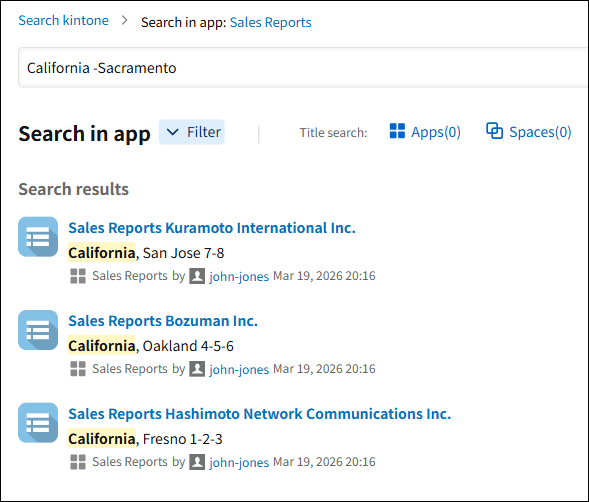 Example of keyword exclusion search in "Search in app"
In Search all contents or Search in app, add a hyphen before any keyword you want to exclude: "-(keyword to exclude)". For example, searching "California -Sacramento" in a sales daily report app returns records for clients in California outside Sacramento.
App settings history can now show up to 1,000 entries
The App settings history screen in App settings now shows up to 1,000 history entries. Previously, only up to 50 entries were available. More history is now retained, making it easier to review change history even for frequently updated apps or apps whose settings were changed long ago.
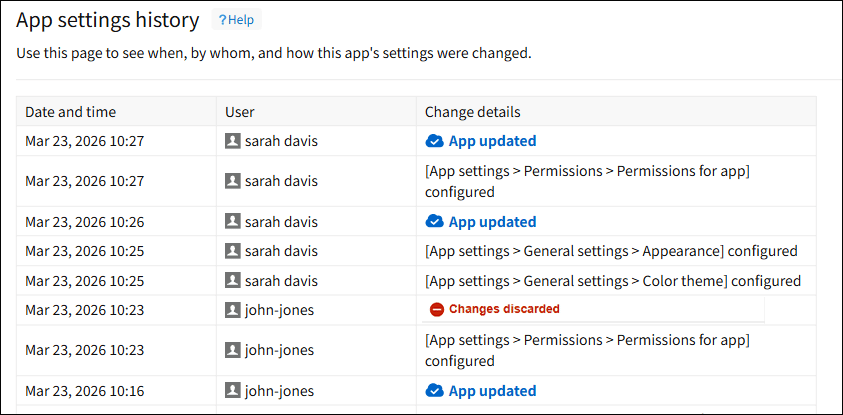 "App settings history" screen in App settings
The number of users with access can now be viewed on the "App management" screen
Two columns — Regular users with access and Guest users with access — have been added to the app list on the App management screen, showing how many users of each type can access each app. This is useful during app audits, for example, to check whether more users than necessary have access. This feature is available to Users & system administrators only.
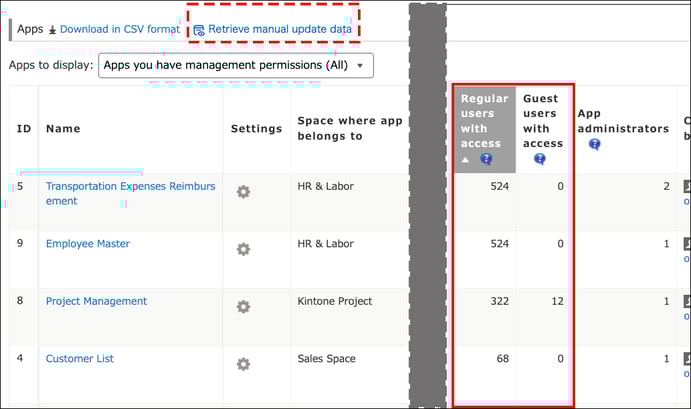 "App management" screen after the update
You can now check Regular users with access and Guest users with access for each app. Use Retrieve manual update data to get the latest counts.
Note
- The Regular users with access and Guest users with access counts reflect the same conditions as regular access checks, including each app's access permission settings and the visibility scope of the space or app group it belongs to.
- Users & system administrators and Kintone administrators who can access all apps, as well as users with the "Manage app" permission, are excluded from the displayed count regardless of their individual access permission settings.
The number of apps referencing each app can now be viewed on the "App management" screen
An Apps referencing this app column has been added to the app list on the App management screen. You can see how many other apps reference each app via Lookup or Related records fields. This is useful during app audits, for example, to periodically check whether the number of apps being referenced by many other apps is growing beyond expectations.
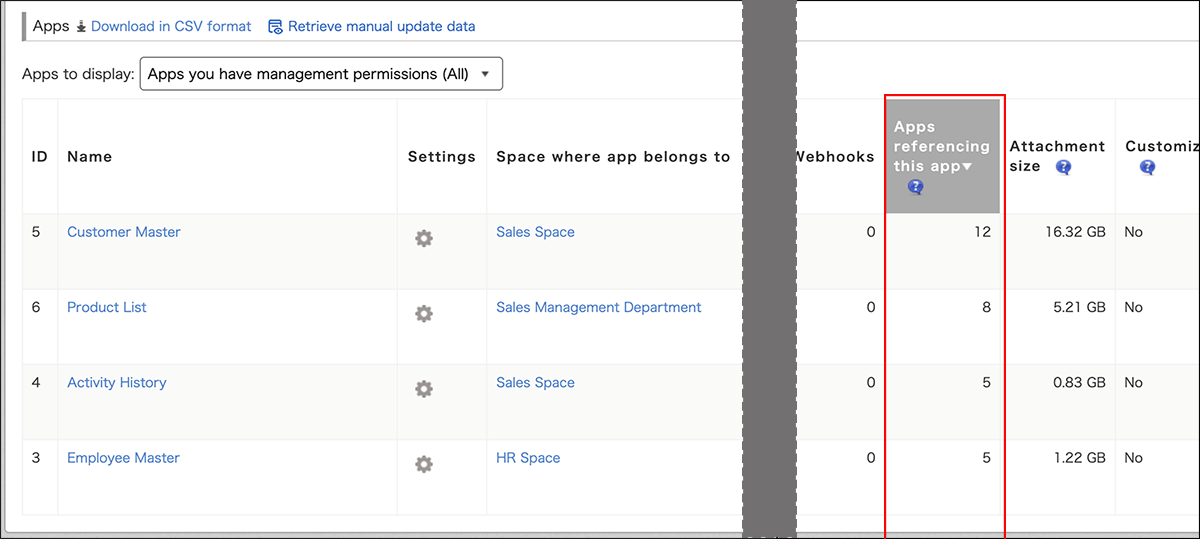 "App management" screen after the update
Note
- This column's values are updated daily and do not reflect changes in real time.
- To see which specific apps are referencing a given app, go to the Apps referencing this app screen in App settings.
Photos can now be edited before uploading as file attachments on iOS
In the iOS Kintone mobile app, you can now edit photos — taken on the spot or selected from your photo library — before uploading them as file attachments. You can rotate, crop, and adjust brightness and contrast, reducing the need to reshoot or edit photos in a separate app.
Editing a photo before attaching a file
Rotating and cropping
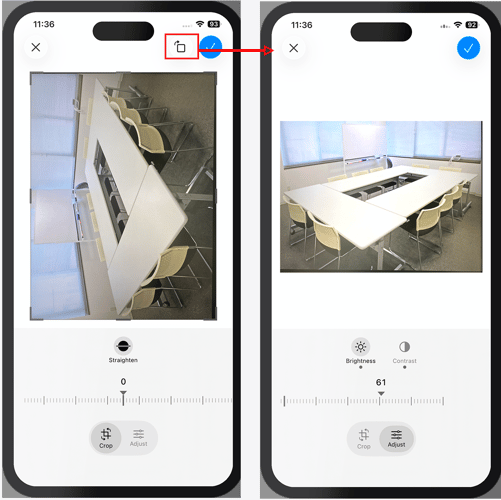
Adjusting brightness and contrast
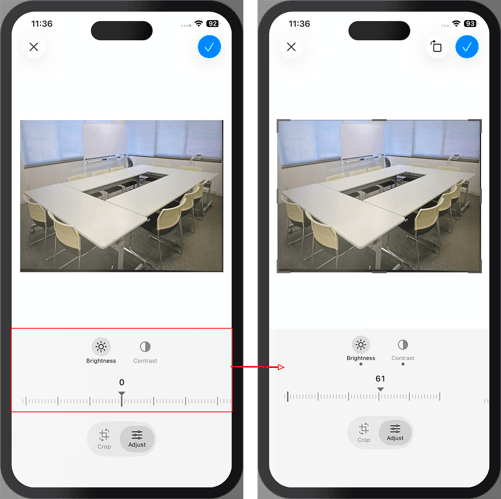
Note
- The screens above are under development.
- This feature requires iOS 18.4 or later.
- A mobile app update is required to use this feature. The update including this feature is scheduled for release in April.
Document-optimized auto-adjustment is now available when capturing documents on Android
The Android Kintone mobile app now features "Capture and adjust document". When you take a photo, document-optimized adjustments — including cropping, skew/distortion adjustment, and brightness adjustment — are automatically applied, making it easy to upload clearer, more readable images directly from the mobile app without the need for a separate scanning app.
Capturing a document
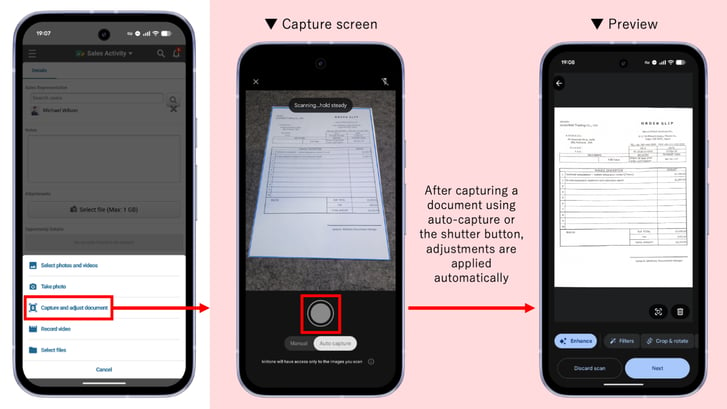
When using Capture and adjust document, cropping, skew/distortion adjustment, and brightness adjustment are automatically applied after capturing.
Note
- The screens above are under development.
- A mobile app update is required to use this feature. The update including this feature is scheduled for release in April.
Malay language is now available on the profile screen and the "Users & system administration" screen
Malay language support is now available on the profile screen and the Users & system administration screen. Users can switch the display language by selecting Malay (Bahasa Melayu) in their account language settings.
API updates
Here are the latest updates to our APIs. For detailed information on each update, see Kintone Developer Program.
Field styles can now be set and retrieved on the "Record details" and "Print record" screens
JavaScript APIs for getting and setting field styles (background color, text color, bold, underline, border color, etc.) are now available on the Record details and Print record screens as well. Since these are the same APIs already released for the New record and Edit record screens, you can develop with a consistent experience across all screens, reducing the learning curve and the need to write screen-specific branching logic. These APIs follow Kintone updates and apply styles appropriately per field, making them easier to maintain than the previous element-based approach.
APIs
Field style get/set JavaScript APIs for "New record", "Edit record", "Record details", and "Print record" screens (desktop):
| API to set field style | kintone.app.record.setFieldStyle() |
| API to get field style | kintone.app.record.getFieldStyle() |
Field style get/set JavaScript APIs for "New record", "Edit record", "Record details", and "Print record" screens (mobile):
| API to set field style | kintone.mobile.app.record.setFieldStyle() |
| API to get field style | kintone.mobile.app.record.getFieldStyle() |
For details, see the developer network: https://kintone.dev/en/news/api-updates/2026-04/
For the already-released APIs for record add/edit screens, see:
- https://kintone.dev/en/docs/kintone/js-api/record/set-field-style/
- https://kintone.dev/en/docs/kintone/js-api/record/get-field-style/
Styles can now be set and retrieved for cells in view tables
JavaScript APIs for getting and setting styles (background color, text color, bold, underline, etc.) have been added for header and body cells in view tables. These APIs follow Kintone updates and apply styles appropriately per cell, making them easier to maintain than the previous element-based approach. Additionally, they support style changes for the header row, record detail button column, and edit/delete button column, which were not supported by previous APIs.
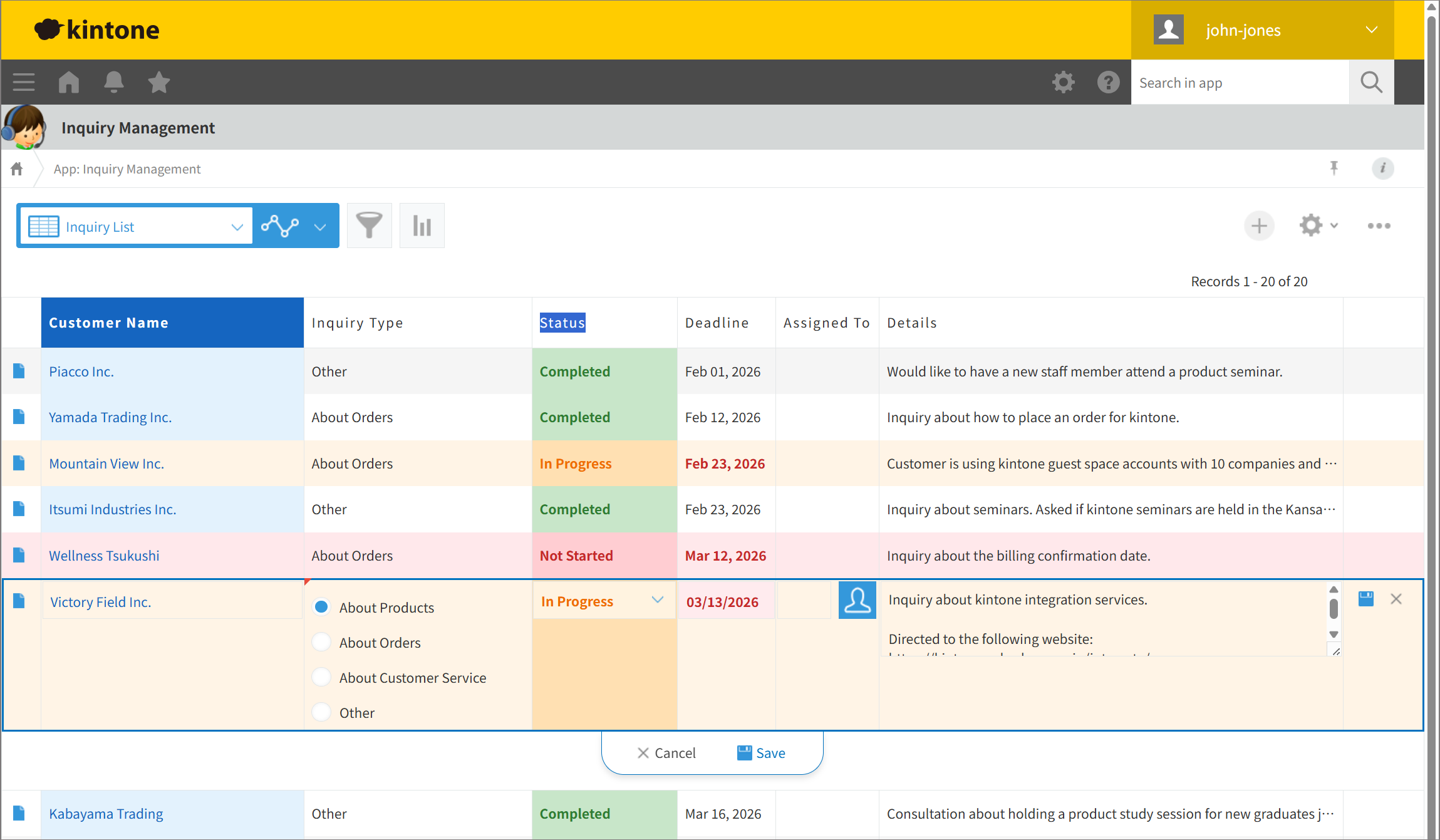 View table style change example (desktop view)
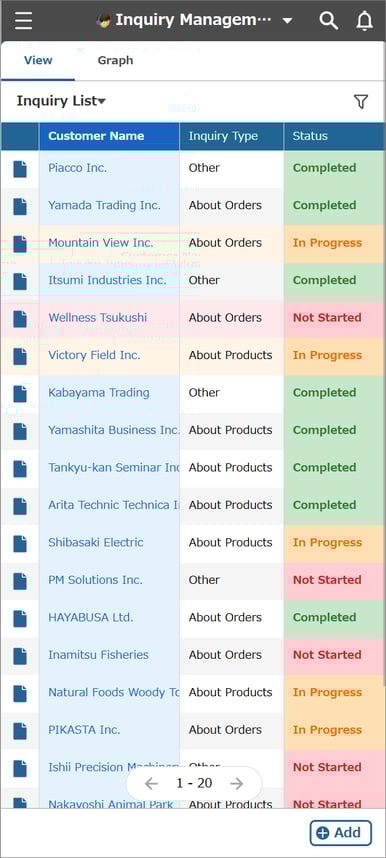 View table style change example (mobile-optimized view)
APIs
View table style get/set JavaScript APIs (desktop):
| API to set view table style | kintone.app.setRecordListStyle() |
| API to get view table style | kintone.app.getRecordListStyle() |
View table style get/set JavaScript APIs (mobile):
| API to set view table style | kintone.mobile.app.setRecordListStyle() |
| API to get view table style | kintone.mobile.app.getRecordListStyle() |
For details, see the developer network: https://kintone.dev/en/news/api-updates/2026-04/
New features under consideration
Below are features currently under consideration. You can try these features by enabling them on the Update options screen in Kintone administration. We welcome your feedback on these features. Please submit feedback via the Help us improve Kintone form.
Note that features under consideration may undergo specification changes or have their availability on the Update options screen started/ended at any time, not just during scheduled maintenance.
Front-end update for portal screens
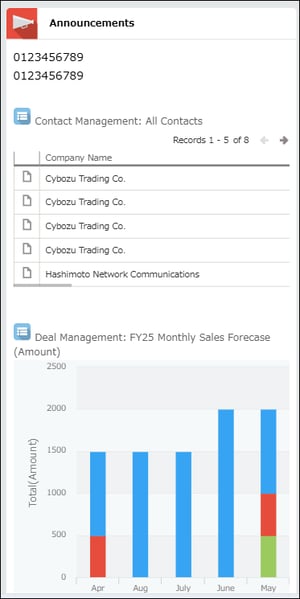
The Kintone development team is progressively rolling out front-end updates across various screens to accelerate future product improvements, modernizing technology that has been in place since the initial release. In this update, the front-end of desktop and mobile portal screens has been updated, with some layout and component changes.
For details on the front-end update initiative, see the February 2023 Product Updates page.
Before (desktop view)
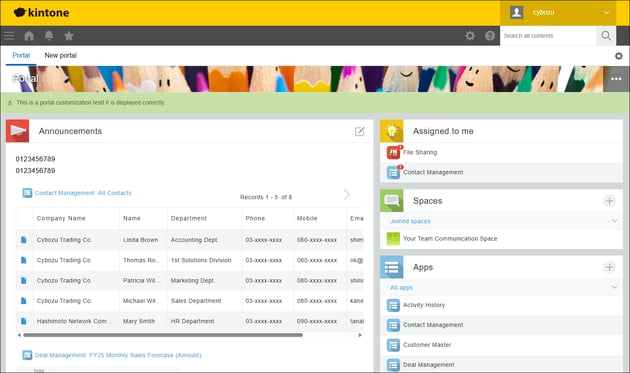
After (desktop view)
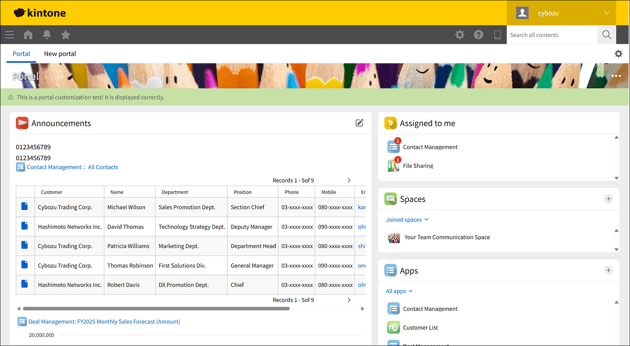
Before (mobile-optimized view)
After (mobile-optimized view)
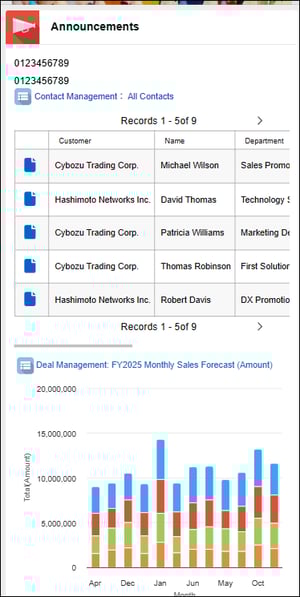
Note that the screens above are under development.
Announcements editor updates
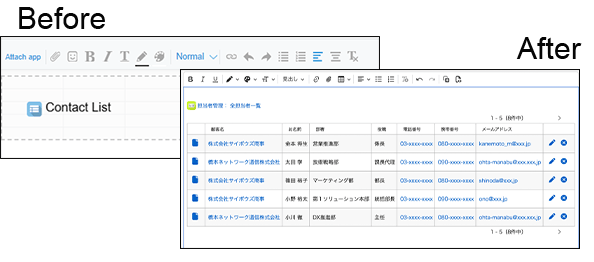
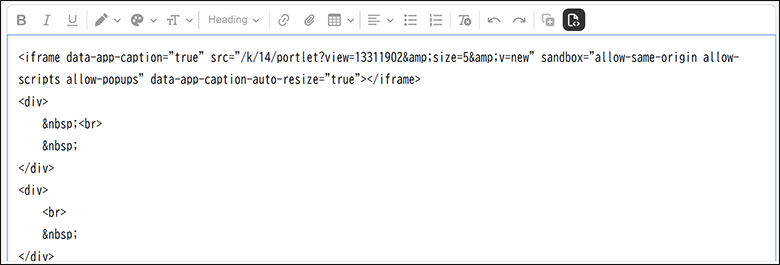
The renewed Announcements editor will support the following new editing operations.
Preview attached apps in the editor
HTML source editing
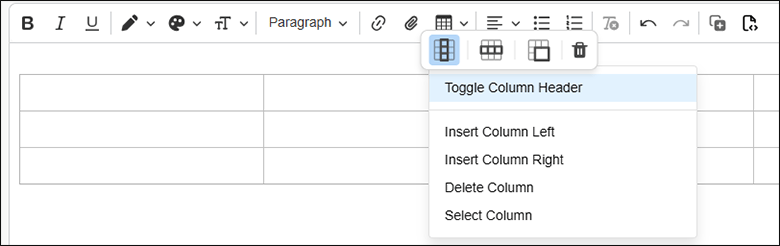
Insert and edit tables
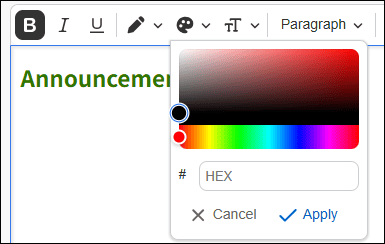
Flexible text and background color options
Update options
Update Options is a tool that allows administrators to control how Kintone updates are applied. Using the options, administrators can choose when to roll out updates to their team.
To access Update Options, click the gear wheel to the left of the search bar and select Kintone administration. Select Update options under Other.
Available update options
| Option | Available feature | Note |
| Disable new features | Ability to ask AI to review app settings (Available in Kintone AI) | These features can be disabled until the May 2026 update is released. |
| New "Import from file" screen | ||
| Front-end update for the "Imported files" screen | ||
| Enhanced JavaScript API support (December 2025–February 2026 versions) | ||
| Usage dashboard (for Wide and Standard license plans only) | ||
| Support for numbers with thousand separators when importing CSV files | ||
| Ability to view change history of app settings | ||
| Display number of API tokens and Webhooks on "App management" screen | ||
| Ability to use partial match search for records in "Lookup" fields | These features can be disabled until the August 2026 update is released. | |
| Export record comments | ||
| Ability to use "App", "Space", "Assigned to me", and "Notifications" widgets on additional portals | ||
| Ability for Kintone administrators to prohibit granting the "Manage app" permission to the "Everyone" group | ||
| Assigned to me widget for the mobile app (Android) | ||
| UPDATED Enhanced JavaScript API support (March–April 2026 versions) |
||
| NEW Ability to exclude keywords in search |
||
| NEW Increase the number of viewable entries in "App settings history" to 1,000 |
||
| NEW Display number of users with access on "App management" screen |
||
| NEW Display number of "Apps referencing this app" on "App management" |
||
| NEW Image editing when attaching files on the mobile app (iOS) |
||
| NEW Capture and adjust documents when attaching files on the mobile app (Android) |
||
| Preview upcoming new features | None | |
| New features under consideration | Improved Kintone Administration Design ("Header Color" Screen Design and Layout Change) | |
| Front-end updates to "Create from Excel" app creation screens and changed import error handling | ||
| Ability to find apps with AI (Available in Kintone AI) | ||
| New "Notifications" screen | ||
| Front-end update for the header and global navigation bar in the mobile-optimized view | ||
| NEW Enable this feature: Front-end update for the "Portal" screen (desktop and mobile views) |
Note that these features may be modified outside of scheduled updates. Check the Update options screen in Kintone administration for the latest status.


About the Author